
Delete 1218.searchexpert
sherred Posted messages 8605 Status Member -
Hello,
Does anyone have a solution to remove 1218.searchexpert that has appeared on my Google?
Thank you in advance for the replies.
4 answers
-
Hello.
Download FRST.
Once downloaded, save it to the desktop and right-click on FRST, then choose Run as administrator, you will see this:

Wait for the message the tool is ready to work to appear, then click on Analyze
Warning, wait for the messages saying that the analysis is finished to appear.

At the end of the analysis, you will have two text files on the desktop FRST and Addition.

Then send the FRST and ADDITION reports to https://www.cjoint.com/ and provide the two links generated by https://www.cjoint.com/ in your reply.
bazfile
Moderator/Contributor security.
a hello, a reply, a thank you are always appreciated.-
-
Reset Google Chrome with Reset Browser and let me know if 1218.searchexpert is still present.
-
-
Tell me more, is it only on Chrome or on other browsers as well?
Is Chrome synced?
Procedure to follow in the indicated order:
1- Open FRST as an administrator by right-clicking on FRST and selecting run as administrator
2 - Copy the entire script located in the box below:Start:: CreateRestorePoint: CloseProcesses: HKLM-x32\...\Run: [Star Rail_launcher_hoyoverse_PC_1_1] => [X] HKU\S-1-5-21-2967608470-3524776717-1053623436-1001\...\Run: [GalaxyClient] => [X] Task: {A469ACC4-0A2B-4121-8938-B07BE5C04CCE} - System32\Tasks\ASUS\P508PowerAgent_sdk => C:\Program Files (x86)\ASUS\ArmouryDevice\dll\ShareFromArmouryIII\Mouse\ROG STRIX CARRY\P508PowerAgent.exe (File not found) Task: {E0F10DCF-44AD-40E8-9370-FB5DA59F93FB} - System32\Tasks\Microsoft\Windows\UpdateOrchestrator\USO_UxBroker => %systemroot%\system32\MusNotification.exe (File not found) S3 BraveElevationService; "C:\Program Files\BraveSoftware\Brave-Browser\Application\122.1.63.165\elevation_service.exe" [X] S3 cpuz158; \??\C:\Windows\temp\cpuz158\cpuz158_x64.sys [X] U4 npcap_wifi; no ImagePath AlternateDataStreams: C:\ProgramData\Microsoft\Windows\Start Menu\desktop.ini:B1DA6C571C [3442] AlternateDataStreams: C:\ProgramData\Microsoft\Windows\Start Menu\DTS_AudioProcessingObject_3x_Settings.xml:8C0A79959F [3442] AlternateDataStreams: C:\ProgramData\Microsoft\Windows\Start Menu\DTS_AudioProcessingObject_3x_Settings.xml:951539ED47 [3442] AlternateDataStreams: C:\ProgramData\Microsoft\Windows\Start Menu\Programs\Acrobat Reader DC.lnk:00422B34A3 [3442] AlternateDataStreams: C:\ProgramData\Microsoft\Windows\Start Menu\Programs\desktop.ini:41964AA945 [3442] AlternateDataStreams: C:\ProgramData\Microsoft\Windows\Start Menu\Programs\Google Chrome.lnk:C8B6D970BF [3442] FirewallRules: [{775E8D34-854C-43BD-9DD7-C4D0AAB870EC}] => (Allow) C:\Users\Utilisateur\AppData\Roaming\Zoom\bin\airhost.exe => File not found FirewallRules: [{780E7596-6F9D-4EB7-A3B8-D511AB0C6FFA}] => (Allow) C:\Users\Utilisateur\AppData\Roaming\Zoom\bin\airhost.exe => File not found EmptyTemp: End::3- Once the script is copied, click on Fix, FRST will automatically take the script from the clipboard.

Let the fix complete and once finished, you will be prompted to restart your PC. Do so as soon as prompted, see below.
Then once your computer has restarted:
4- You will have a Fixlog file on your desktop, then send this fixlog report to https://www.cjoint.com/ and provide the link generated by https://www.cjoint.com/ in your reply.
5- Reset Chrome using this method.
6- CHECK AND TELL ME IF YOUR PROBLEM IS STILL PRESENT
-
-
-
If you have this problem only on Google Chrome, follow the steps in the order indicated:
1- Desynchronize Chrome https://support.google.com/chrome/answer/185277
2- Reset Chrome https://support.google.com/pixelslate/answer/3296214
3- Go to this page and click on clear data for more information regarding this operation on this page, section Repair Google Chrome with active synchronization.
4- Resynchronize Chrome and check if your problem persists.
-
Since searchexpert does not appear in the FRST reports, it must come from the registry or elsewhere.
Uninstall Revo Uninstaller Google Chrome in advanced scan mode.
Then reinstall Google Chrome.
Revo Uninstaller tutorial to read carefully.
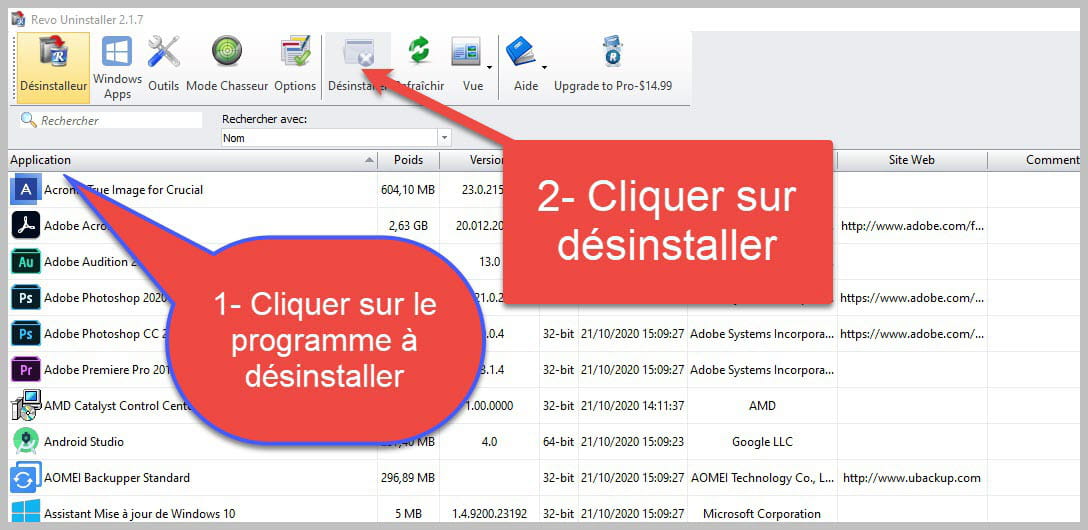

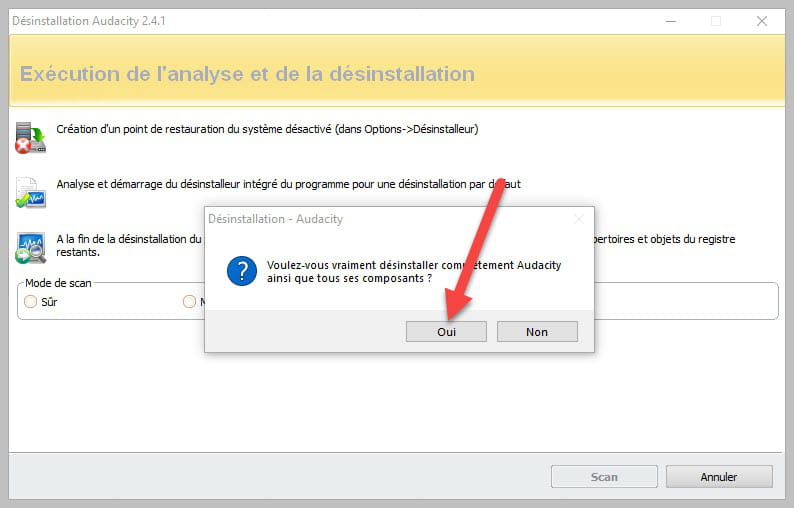
Accept the uninstallation of the program you want to uninstall, and if there is an error message stating that uninstallation is impossible, close the error message and continue the procedure.

Check "Advanced scan" and then click "Scan".

Be careful, it is very important to delete the remaining registry items.
Click on "Select all" then on "Delete", if a second list appears, do the same and once everything is deleted, click on "Finish"; a restart may be requested.
-
Hello
ZHPCleaner works well against this type of redirection
Best regards
When the boundaries are crossed, there are no more limits
What I wrote, I wrote

