KRYPTIK Malware
Solved
ludoAR
Posted messages
343
Registration date
Status
Member
Last intervention
-
MisteryBean Posted messages 8950 Registration date Status Moderator Last intervention -
MisteryBean Posted messages 8950 Registration date Status Moderator Last intervention -
Hello,
For several days I noticed that something was wrong, I downloaded CCleaner, it found nothing, I ran a scan with Windows Defender and it found nothing, this morning I used Advanced System Repair Pro and it found the attachment. So I downloaded Roguekiller, did a scan and it found some issues which I deleted, I turned off the computer, turned it back on, and ran Roguekiller again, and it found nothing.
Do you think this is enough and that MALWARE KRYPTIK has really vanished please? Thank you <3
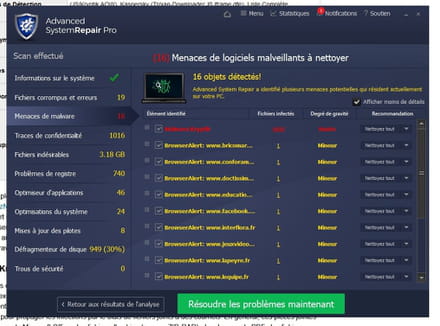
For several days I noticed that something was wrong, I downloaded CCleaner, it found nothing, I ran a scan with Windows Defender and it found nothing, this morning I used Advanced System Repair Pro and it found the attachment. So I downloaded Roguekiller, did a scan and it found some issues which I deleted, I turned off the computer, turned it back on, and ran Roguekiller again, and it found nothing.
Do you think this is enough and that MALWARE KRYPTIK has really vanished please? Thank you <3

13 answers
-
Hello
advanced system repair pro is a great piece of crap, to be uninstalled urgently
Ccleaner has nothing to do with an antivirus, so it’s normal that it finds nothing.
-------------------
-------------------------------------------
Hello,
Let’s start with a PC diagnosis:Read the entire procedure before posting the reports
The reports FRST.txt and Addition.txt are expected
Do not post them directly in the messages as they are unreadable and incomplete
All reports must be hosted on https://security-x.fr/up/ and you indicate the obtained links in your reply
---------------------------------------------------------------------------------------------
--> The SmartScreen filter may trigger an alert. Click on Actions or More info and then on Run anyway
---------------------------------------------------------------------------------------------
--> Download the FRST version of Farbar, compatible with your system and save the file on your Desktop
--> For a 32-bit system
--> For a 64-bit system
How to know whether a 32-bit or 64-bit version is running on my system?
--> Wait for your browser to prompt you to download without clicking anywhere, especially not on the page sponsors.
--> Close all applications, including your browser
--> Double-click on FRST.exe and click Yes to accept the Disclaimer
--> Under Vista, Windows 7 / 8 and 10, you must run the file by right-clicking -> Run as administrator
--> Wait until it indicates The tool is ready to function
--> On the main menu, click on Analyze and wait for the analysis to complete
--> At the end of the scan, the reports FRST.txt and Addition.txt are created. Post these reports in your next reply.
--> The reports are saved in the same location as the tool and under C:\FRST\Logs
--Security contributor. -
RE_
Thank you very much for your precious help, I'm sorry for copying but it tells me that textup is unavailable
I didn't ask you to post on textup, https://up.security-x.fr/ is there for that.
Rogue killer has removed advance, so not really an infection
I'm sorry but it tells me this I cannot correct
Are you copying all the text correctly? from S of start to the two :: of end?
--
Security contributor. -
RE_
OK, for FRST:
To automatically delete all files/folders created by FRST and the tool itself, rename FRST/FRST64.exe to uninstall.exe and execute it.
The procedure requires a restart
Best of luck :-)
--
Security Contributor. -
Thank you so much Mysterybean, you're really nice!
https://up.security-x.fr/file.php?h=R22d90bf82599adfadf74eb90d6e5c9c2 -
et the 2nd
https://up.security-x.fr/file.php?h=R6e1739103a97ece92b7fe5d78ece02df -
For Advanced System Repair Pro, I can no longer find it in "programs"; I think Roguekiller must have uninstalled it.
-
RE_
Apparently, a ransomware has been blocked. We will just clean some obsolete files.
Can you post the RogueKiller scan to see what it detected? => https://www.adlice.com/fr/docs/roguekiller/commencer/rapports-scan/
-------------------------
--------------------------------------------
--> Copy what is found here https://textup.fr/631490z8 from start:: to end:: (without pasting it anywhere)
--> Open FRST (or FRST64) as administrator and click on Fix
If FRST seems to freeze or does not respond, let it run
--> The PC will restart
--> A fixlog file is created in the same location as FRST, post it like the other reports
--Security contributor. -
Thank you very much for your valuable help, I'm sorry to copy-paste but it tells me that textup is unavailable
RogueKiller Anti-Malware V14.8.5.0 (x64) [Feb 12 2021] (Free) by Adlice Software
email: https://www.adlice.com/contact/
Website: https://www.adlice.com/roguekiller/
Operating System: Windows 10 (10.0.19043) 64 bits
Started in: Normal mode
User: Quinou [Administrator]
Started from: C:\Program Files\RogueKiller\RogueKiller64.exe
Signatures: 20220530_080817, Driver: Loaded
Mode: Standard Scan, Scan -- Date: 2022/05/30 15:38:53 (Duration: 00:03:46)
Switches: -minimize
¤¤¤¤¤¤¤¤¤¤¤¤¤¤¤¤¤¤¤¤¤¤¤¤ Processes ¤¤¤¤¤¤¤¤¤¤¤¤¤¤¤¤¤¤¤¤¤¤¤¤
[PUP.AdvancedSystemRepair (Potentially Malicious)] AdvancedSystemRepairPro.exe (17192) -- (Advanced System Repair Inc) C:\Program Files (x86)\Advanced System Repair Pro 1.9.3.8.0\AdvancedSystemRepairPro.exe -> Found
¤¤¤¤¤¤¤¤¤¤¤¤¤¤¤¤¤¤¤¤¤¤¤¤ Process Modules ¤¤¤¤¤¤¤¤¤¤¤¤¤¤¤¤¤¤¤¤¤¤¤¤
¤¤¤¤¤¤¤¤¤¤¤¤¤¤¤¤¤¤¤¤¤¤¤¤ Services ¤¤¤¤¤¤¤¤¤¤¤¤¤¤¤¤¤¤¤¤¤¤¤¤
¤¤¤¤¤¤¤¤¤¤¤¤¤¤¤¤¤¤¤¤¤¤¤¤ Tasks ¤¤¤¤¤¤¤¤¤¤¤¤¤¤¤¤¤¤¤¤¤¤¤¤
[PUP.AdvancedSystemRepair (Potentially Malicious)] (Advanced System Repair Inc) \ASR-Startup -- C:\Program Files (x86)\Advanced System Repair Pro 1.9.3.8.0\AdvancedSystemRepairPro.exe [/minimize] -> Found
[Adw.Component (Malicious)] \ContentManagement -- %appdata%\Archiver\Archiver.exe -> Found
¤¤¤¤¤¤¤¤¤¤¤¤¤¤¤¤¤¤¤¤¤¤¤¤ Registry ¤¤¤¤¤¤¤¤¤¤¤¤¤¤¤¤¤¤¤¤¤¤¤¤
>>>>>> XX - Uninstall
[PUP.AdvancedSystemRepair (Potentially Malicious)] (X64) HKEY_USERS\S-1-5-21-2468137677-4287202791-2568431094-1001\Software\Microsoft\Windows\CurrentVersion\Uninstall\Advanced System Repair Pro -- N/A -> Found
¤¤¤¤¤¤¤¤¤¤¤¤¤¤¤¤¤¤¤¤¤¤¤¤ WMI ¤¤¤¤¤¤¤¤¤¤¤¤¤¤¤¤¤¤¤¤¤¤¤¤
¤¤¤¤¤¤¤¤¤¤¤¤¤¤¤¤¤¤¤¤¤¤¤¤ Hosts File ¤¤¤¤¤¤¤¤¤¤¤¤¤¤¤¤¤¤¤¤¤¤¤¤
¤¤¤¤¤¤¤¤¤¤¤¤¤¤¤¤¤¤¤¤¤¤¤¤ Files ¤¤¤¤¤¤¤¤¤¤¤¤¤¤¤¤¤¤¤¤¤¤¤¤
[PUP.AdvancedSystemRepair (Potentially Malicious)] (shortcut) Advanced System Repair Pro.lnk -- C:\Users\Public\Desktop\Advanced System Repair Pro.lnk => C:\PROGRA~2\ADVANC~1.0\ADVANC~1.EXE -> Found
[Adw.Component (Malicious)] (folder) Archiver -- C:\Users\Quinou\AppData\Roaming\Archiver -> Found
[PUP.AdvancedSystemRepair (Potentially Malicious)] (shortcut) Advanced System Repair Pro.lnk -- C:\Users\Quinou\AppData\Roaming\Microsoft\Windows\Start Menu\Programs\Advanced System Repair Pro\Advanced System Repair Pro.lnk => C:\PROGRA~2\ADVANC~1.0\ADVANC~1.EXE -> Found
[PUP.AdvancedSystemRepair (Potentially Malicious)] (shortcut) Uninstall Advanced System Repair Pro.lnk -- C:\Users\Quinou\AppData\Roaming\Microsoft\Windows\Start Menu\Programs\Advanced System Repair Pro\Uninstall Advanced System Repair Pro.lnk => C:\PROGRA~2\ADVANC~1.0\ADVANC~1.EXE [/u] -> Found
[PUP.AdvancedSystemRepair (Potentially Malicious)] (folder) Advanced System Repair Pro 1.9.3.8.0 -- C:\Program Files (x86)\Advanced System Repair Pro 1.9.3.8.0 -> Found
¤¤¤¤¤¤¤¤¤¤¤¤¤¤¤¤¤¤¤¤¤¤¤¤ Web Browsers ¤¤¤¤¤¤¤¤¤¤¤¤¤¤¤¤¤¤¤¤¤¤¤¤
¤¤¤¤¤¤¤¤¤¤¤¤¤¤¤¤¤¤¤¤¤¤¤¤ Antirootkit: 0 (Driver: Loaded) ¤¤¤¤¤¤¤¤¤¤¤¤¤¤¤¤¤¤¤¤¤¤¤¤ -
and the 2nd
RogueKiller Anti-Malware V14.8.5.0 (x64) [Feb 12 2021] (Free) by Adlice Software
email: https://www.adlice.com/contact/
Website: https://www.adlice.com/roguekiller/
Operating System: Windows 10 (10.0.19043) 64 bits
Started in: Normal mode
User: Quinou [Administrator]
Started from: C:\Program Files\RogueKiller\RogueKiller64.exe
Signatures: 20220530_080817, Driver: Loaded
Mode: Standard Scan, Removal -- Date: 2022/05/30 15:43:35 (Duration: 00:03:46)
Switches: -minimize
¤¤¤¤¤¤¤¤¤¤¤¤¤¤¤¤¤¤¤¤¤¤¤¤ Removal ¤¤¤¤¤¤¤¤¤¤¤¤¤¤¤¤¤¤¤¤¤¤¤¤
[PUP.AdvancedSystemRepair (Potentially Malicious)] AdvancedSystemRepairPro.exe [Advanced System Repair Inc] -- %programfiles(x86)%\Advanced System Repair Pro 1.9.3.8.0\AdvancedSystemRepairPro.exe -> Killed [Tree]
[PUP.AdvancedSystemRepair (Potentially Malicious)] \ASR-Startup -- C:\Program Files (x86)\Advanced System Repair Pro 1.9.3.8.0\AdvancedSystemRepairPro.exe (/minimize) -> Removed
[Adw.Component (Malicious)] \ContentManagement -- %appdata%\Archiver\Archiver.exe -> Removed
[PUP.AdvancedSystemRepair (Potentially Malicious)] HKEY_USERS\S-1-5-21-2468137677-4287202791-2568431094-1001\Software\Microsoft\Windows\CurrentVersion\Uninstall\Advanced System Repair Pro -- -> Removed
[PUP.AdvancedSystemRepair (Potentially Malicious)] Advanced System Repair Pro.lnk -- %SystemDrive%\Users\Public\Desktop\Advanced System Repair Pro.lnk (lnk => C:\PROGRA~2\ADVANC~1.0\ADVANC~1.EXE []) -> Removed
[Adw.Component (Malicious)] Archiver -- %_Quinou_appdata%\Archiver -> Removed
=> Archiver.exe -- C:\Users\Quinou\AppData\Roaming\Archiver\Archiver.exe -> Removed
[PUP.AdvancedSystemRepair (Potentially Malicious)] Advanced System Repair Pro.lnk -- %_Quinou_appdata%\Microsoft\Windows\Start Menu\Programs\Advanced System Repair Pro\Advanced System Repair Pro.lnk (lnk => C:\PROGRA~2\ADVANC~1.0\ADVANC~1.EXE []) -> Removed
[PUP.AdvancedSystemRepair (Potentially Malicious)] Uninstall Advanced System Repair Pro.lnk -- %_Quinou_appdata%\Microsoft\Windows\Start Menu\Programs\Advanced System Repair Pro\Uninstall Advanced System Repair Pro.lnk (lnk => C:\PROGRA~2\ADVANC~1.0\ADVANC~1.EXE [/u]) -> Removed
[PUP.AdvancedSystemRepair (Potentially Malicious)] Advanced System Repair Pro 1.9.3.8.0 -- %programfiles(x86)%\Advanced System Repair Pro 1.9.3.8.0 -> Removed
=> 7z.dll -- C:\PROGRA~2\ADVANC~1.0\7z\7z.dll -> Removed
=> 7z.exe -- C:\PROGRA~2\ADVANC~1.0\7z\7z.exe -> Removed
=> License.txt -- C:\PROGRA~2\ADVANC~1.0\7z\License.txt -> Removed
=> 7z -- C:\PROGRA~2\ADVANC~1.0\7z -> Removed
=> AdvancedSystemRepairPro.exe -- C:\PROGRA~2\ADVANC~1.0\ADVANC~1.EXE -> Removed
=> api.dat -- C:\PROGRA~2\ADVANC~1.0\api.dat -> Removed
=> api.tlb -- C:\PROGRA~2\ADVANC~1.0\api.tlb -> Removed
=> asrscan.inf -- C:\PROGRA~2\ADVANC~1.0\asrscan.inf -> Removed
=> asrscan.sys -- C:\PROGRA~2\ADVANC~1.0\asrscan.sys -> Removed
=> BouncyCastle.Crypto.dll -- C:\PROGRA~2\ADVANC~1.0\BOUNCY~1.DLL -> Removed
=> dsutil.exe -- C:\PROGRA~2\ADVANC~1.0\dsutil.exe -> Removed
=> InfExtractor.dll -- C:\PROGRA~2\ADVANC~1.0\INFEXT~1.DLL -> Removed
=> lang_fr.dat -- C:\PROGRA~2\ADVANC~1.0\lang_fr.dat -> Removed
=> Microsoft.Deployment.WindowsInstaller.dll -- C:\PROGRA~2\ADVANC~1.0\MICROS~2.DLL -> Removed
=> Microsoft.Experimental.IO.dll -- C:\PROGRA~2\ADVANC~1.0\MICROS~1.DLL -> Removed
=> Newtonsoft.Json.dll -- C:\PROGRA~2\ADVANC~1.0\NEWTON~1.DLL -> Removed
=> pcw.dll -- C:\PROGRA~2\ADVANC~1.0\pcw.dll -> Removed
=> fraglist_d.luar -- C:\PROGRA~2\ADVANC~1.0\reports\FRAGLI~1.LUA -> Removed
=> reports -- C:\PROGRA~2\ADVANC~1.0\reports -> Removed
=> SevenZipSharp.dll -- C:\PROGRA~2\ADVANC~1.0\SEVENZ~1.DLL -> Removed
=> System.Security.Cryptography.Algorithms.dll -- C:\PROGRA~2\ADVANC~1.0\SYSTEM~4.DLL -> Removed
=> System.Security.Cryptography.Encoding.dll -- C:\PROGRA~2\ADVANC~1.0\SYSTEM~1.DLL -> Removed
=> System.Security.Cryptography.Primitives.dll -- C:\PROGRA~2\ADVANC~1.0\SYSTEM~2.DLL -> Removed
=> System.Security.Cryptography.X509Certificates.dll -- C:\PROGRA~2\ADVANC~1.0\SYSTEM~3.DLL -> Removed
=> tfj2.res -- C:\PROGRA~2\ADVANC~1.0\tfj2.res -> Removed
=> ZetaLongPaths.dll -- C:\PROGRA~2\ADVANC~1.0\ZETALO~1.DLL -> Removed -
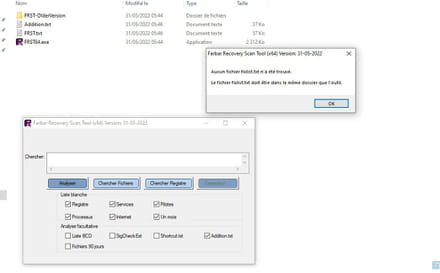
I'm sorry, but it tells me that I cannot correct this.
-
Hello Misterybean, you are great, thank you very much for your help. Attached is the fixlist report
https://up.security-x.fr/file.php?h=R4586194b17f404eca714e5f046372b44 -
RE_
OK for the fix. Do you still have any issues regarding what you indicated at the beginning?For several days now, I've noticed that things haven't been going well
--
Security contributor. -
I had:
icons (which changed at every startup) that disappeared in the taskbar
sent programs that closed by themselves
open office that was grinding
the fan's heatsink that was rising and running all the time (between 78° and 88°)
nvidia that talked about updates
violation messages
anyway THANK YOU VERY MUCH none of that, have a nice evening