EBP Software
Hello,
I installed the software on my work laptop.
However, when I try to launch it, the following message appears:
" Unable to extract temporary files from Microsoft SQL server express 2014 SP 1 (x64) installation.#1001.
Please free up some Space on your boot drive and try again. EBP gestion bâtiment 2019 11.0 setup cannot continue."
I have cleared up a lot of space on my PC, but it's still not working.
I really don't know much about this, and I don't want to make any mistakes (without my computer, I can't work...).
I would appreciate any help!
Thank you!
Sabrina.
Configuration: Android / Chrome 75.0.3770.143
I installed the software on my work laptop.
However, when I try to launch it, the following message appears:
" Unable to extract temporary files from Microsoft SQL server express 2014 SP 1 (x64) installation.#1001.
Please free up some Space on your boot drive and try again. EBP gestion bâtiment 2019 11.0 setup cannot continue."
I have cleared up a lot of space on my PC, but it's still not working.
I really don't know much about this, and I don't want to make any mistakes (without my computer, I can't work...).
I would appreciate any help!
Thank you!
Sabrina.
Configuration: Android / Chrome 75.0.3770.143
7 answers
-
ModeratorHello,
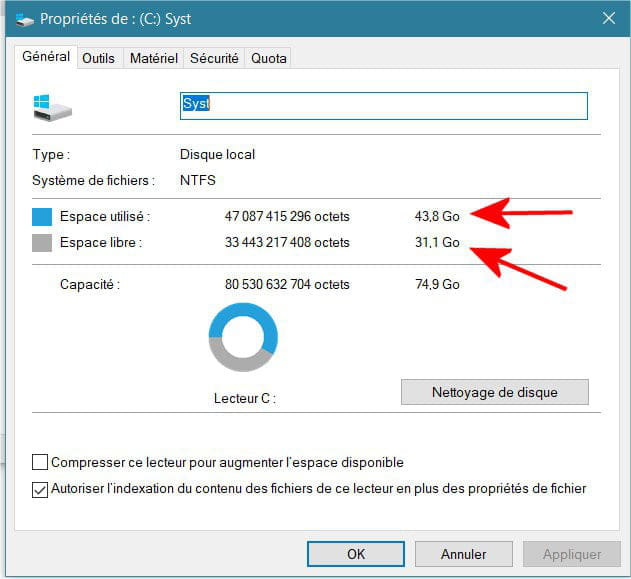
A status report is needed. What is the used and free space on disk C? In File Explorer, right-click on C: and select properties:
Thus, I have 43.8 GB used and 31.1 GB free.
Best regards
--
a stranger is a friend you haven't met yet. -
Hello,
Thank you for your response.
In C, there are 101 GB used and 16.9 GB free.-
ModeratorWell, there is still some space left anyway.
1/ Isn't the necessary disk space for the software installation included in the software prerequisites?
2/ Are there other disk partitions on the PC D:, E:, ... and what are the details about their sizes?
3/ What is the size of the software installation program? And on which disk partition is it located? C:, ...
4/ We could clean up C: and see if that frees up some space: on C: right-click properties + disk cleanup + clean up system files + check all
5/ A quick check, you are installing a 64-bit software, do you have a 64-bit version of Windows? On This PC right-click + properties there should be: System type: 64-bit operating system, x64 processor.
-
-
1/ Required free disk space 3GB.
2/ Yes, D: used space 2.49GB, free space 951GB.
3/ It is on C: "downloads": the whole file is 1.04GB.
4/ I will do it according to your response.
5/ Operating system 64-bit x64 processor.
Thank you!-
ModeratorEverything seems fine. So could you start the cleanup procedure? It will clean up any temporary files that might remain...
Don't you have an old version of SQL Server on the PC that you should uninstall?
Furthermore, I think you should contact EBP support. When I was searching for errors on SQL Server, I saw that said software appeared. See: https://support.ebp.com/hc/fr/articles/360000032838-Installation-du-moteur-Microsoft-SQL-2014-Express -
@jee pee[quote] Everything seems fine. So you could run the cleanup procedure, which cleans up any temporary files that might remain...
Do you have an old version of SQL Server on the PC that should be uninstalled?
See: https://support.ebp.com/hc/fr/articles/360000032838-Installation-du-moteur-Microsoft-SQL-2014-Express
For more, I think you should check with EBP support, I found while looking for SQL Server errors that the software appeared. [/quote]
Hello, did you get the answer you were looking for? Thank you for your feedback. Best regards.
-
-
Hello!
I started the cleaning process which shows that I could free up 10.6 GB on C. Then some files are checked.
I'm hesitant to click ok because I see that it will permanently delete the files. Lol.
What should I do? Check everything? Actually delete? ...
Thanks. -
New info. While digging a bit I found in This: "programs"/"Windows powershell"/ "sqlexpress2014r1bin_x64" = the folder is empty...
-
ModeratorWe are now certain that it is not a space issue, the message is misleading.
The program starts its installation but ...
Is your account an administrator?
I read that SQL Server required the .NET framework 3.5 or 4, if it is not enabled, do it:
Is SQL Server included in the EBP installation or separate?
Because you could try to download it from the official site, but I don't know which one corresponds to the one used by EBP, nor the original version or SP2:
https://www.microsoft.com/fr-fr/download/details.aspx?id=42299
https://www.microsoft.com/fr-FR/download/details.aspx?id=53167
--
a stranger is a friend we haven't met yet. -
Hi,
Sorry for my late reply...
Yes, I am indeed an "administrator."
I have activated the framework.
It hasn't changed anything.
I consistently restart the computer.
It seems to me that the SQL software is included with the EBP software if I understand correctly (in the EBP folder there are several SQL zip files).
What do you think of my last message regarding the "empty file"?
Thank you!