Virus Proxy http=127.0.0.1:8080;https=127.0.0.1:8080
Hello everyone,
For the past few days, I've been unable to go online, both on Google Chrome and Internet Explorer (only Mozilla works). However, I can’t access apps that require the internet like Steam.
The message I receive is as follows: "Some settings are managed by your system administrator."
To note, I am the administrator, I have opened Internet Explorer using right-click - run as administrator, and it still denies me access to the settings. (I'm attaching a few screenshots before attempting to resolve the issue)
I'm attaching a few screenshots:


Thanks in advance hoping you can help me.
For the past few days, I've been unable to go online, both on Google Chrome and Internet Explorer (only Mozilla works). However, I can’t access apps that require the internet like Steam.
The message I receive is as follows: "Some settings are managed by your system administrator."
To note, I am the administrator, I have opened Internet Explorer using right-click - run as administrator, and it still denies me access to the settings. (I'm attaching a few screenshots before attempting to resolve the issue)
I'm attaching a few screenshots:


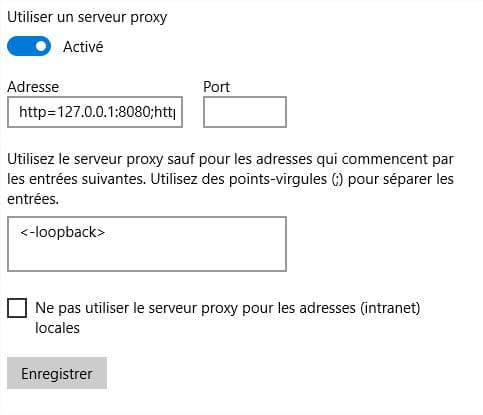

Thanks in advance hoping you can help me.
2 answers
-
Hello, have you tried disabling "Use a proxy server"?
-
ModeratorHello,
Download FRST and once downloaded save it to the desktop then open it and you will see this:
Click on Scan at the end of the scan you will have two text files on the desktop FRST and Addition send these reports to https://pjjoint.malekal.com/ see this tutorial paragraph Send the analysis reports to pjjoint then provide the two links generated by Pjoint in your next message.
--
bazfile
Moderator/Contributor security.