
Completely uninstall McAfee on Windows 10 - Page 3
Solved
Previous
- 1
- 2
- 3
-
re
download SEAF (from C_XX) to your desktop (not in downloads)
run it as administrator (right-click)
check this to configure it before starting the search
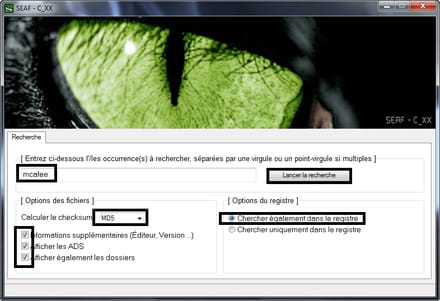
the tutorial to help you if needed >> https://nicolascoolman.eu/2017/02/16/tutoriel-seaf/
the report will be displayed on your desktop and in C:\SeafLog.txt
post the report via 1 copy/paste or via cjoint
if you have any questions...
@+
the radiation level is higher at the employment agency than in Chernobyl -
1. ========================= SEAF 1.0.1.0 - C_XX
2.
3. Started at: 16:02:40 on 18/08/2017
4.
5. Value(s) searched:
6. mcaffee
7.
8. Legend: TC => Creation date, TM => Modification date, DA => Last access
9.
10. (!) --- Calculating the "MD5" Hash
11. (!) --- Additional information
12. (!) --- Displaying ADS
13. (!) --- Displaying folders
14. (!) --- Registry search
15.
16. ====== File(s) ======
17.
18. No files found
19.
20.
21. ====== Registry entry(ies) ======
22.
23. No items found in the registry
24.
25. =========================
26.
27. End at: 16:11:12 on 18/08/2017
28. 1113570 Items analyzed
29.
30. =========================
31. E.O.F
thank you I will be away for a while -
re
there are no traces of Mcafee in the report...
thank you, I’ll be away for a bit
no worries
@+
--
the radiation level is higher at the employment center than at Chernobyl -
Good evening
I think I will buy Bitdefender and if I have any issues installing it, I will ask for help from their support service.
I will mark the subject as completed, but is it possible to delete the results of our discussions beforehand?
Thank you very much.
@+ -
I think I'm going to buy Bitdefender and if I have any issues installing it, I'll ask their support service for help.
There's Windows Defender on W10 which is integrated by default...
I'm going to put the topic as finished, however, is it possible to delete the results of the files from our discussions first?
What do you mean by deleting the results of the files from our discussions?
You still need to do this to delete the tools I made you download and install.
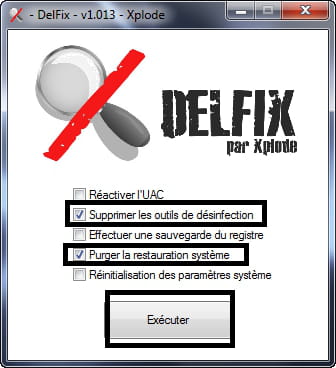
Download Delfix to your desktop >> https://toolslib.net/downloads/viewdownload/2-delfix/
Run it as an administrator (right-click)
Check the box "Clean up system restore" (1 new restore point will be created)
PS: the box "Delete disinfecting tools" is checked by default, leave it checked
Click on run
The report will appear on your desktop and in C:\Defix.txt
Post the report via copy/paste in your response
In the image:
@+
--
The radiation level is higher at the employment center than at Chernobyl. -
By deletion? I meant the large system files that I sent you during our discussions, so those that are on CCM
Unless they are not useful, or you delete them by default.
# DelFix v1.013 - Report created on 08/18/2017 at 18:38:11
# Updated on 04/17/2016 by Xplode
# Username: annie - HOME
# Operating system: Windows 10 Home (64 bit)
~ Deleting disinfection tools ...
Deleted: C:\FRST
Deleted: C:\Users\annie\Desktop\FRST-OlderVersion
Deleted: C:\Program Files (x86)\SEAF
Deleted: C:\SeafLog.txt
Deleted: C:\Users\annie\Desktop\Fixlog.txt
Deleted: C:\Users\annie\Desktop\FRST64.exe
Deleted: C:\Users\annie\Desktop\Search.txt
Deleted: C:\Users\annie\Downloads\Addition.txt
Deleted: C:\Users\annie\Downloads\FRST.txt
Deleted: C:\Users\annie\Downloads\SEAF.exe
Deleted: HKLM\SOFTWARE\Microsoft\Windows\CurrentVersion\Uninstall\SEAF
~ Purging system restore ...
Deleted: RP #1 [Windows Update | 09/08/2017 13:36:08]
Deleted: RP #6 [Scheduled checkpoint | 08/18/2017 07:53:34]
New restore point created!
########## - EOF - ##########
Is this correct?
Thank you -
re
By deletion? I meant the large system files that I sent you during our interviews, so those that are on CCM
Unless they are useless or you delete them automatically.
All of this is part of the discussion topic, which may be useful to other users, and there is nothing to delete
If your problem is resolved, remember to mark your topic as resolved
https://www.commentcamarche.net/infos/25917-marquer-un-fil-de-discussion-comme-etant-resolu/
Thank you
@+
--
the radiation rate is higher at the employment office than in Chernobyl -
I am ending the topic and thank you again for your patience
AB -
re
no worries for the help^^
wishing you all the best
@+
--
the radiation level is higher at the job center than in Chernobyl

Previous
- 1
- 2
- 3