Custom contour (gear wheel)
Wizeep
-
Marelle123 Posted messages 1 Status Member -
Marelle123 Posted messages 1 Status Member -
Hello,
Hello, I'm a beginner on Illustrator and I'm looking to create a circle with a stroke based on a custom shape.
It's the black shape that I want to apply multiple times along the contour of my circle. Like in the small (horrible) red diagram. (Basically, I want to make a gear wheel)
http://hpics.li/e24812c
Configuration: Configuration: Windows / Chrome 56.0.2924.87
Hello, I'm a beginner on Illustrator and I'm looking to create a circle with a stroke based on a custom shape.
It's the black shape that I want to apply multiple times along the contour of my circle. Like in the small (horrible) red diagram. (Basically, I want to make a gear wheel)
http://hpics.li/e24812c
Configuration: Configuration: Windows / Chrome 56.0.2924.87
2 answers
-
Hello Contrariness
Hello wizeep
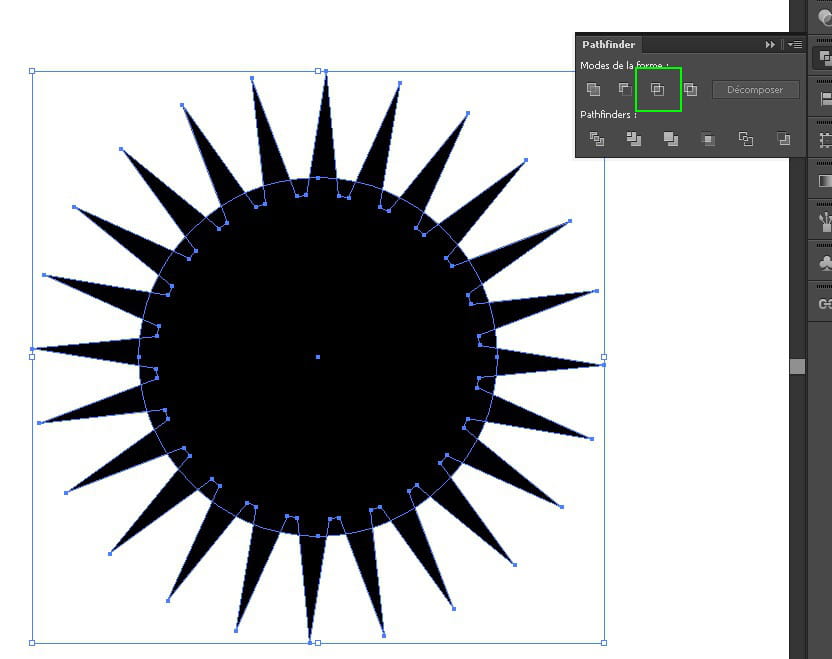
Method with the Pathfinder:
- Draw a star with as many branches as you want from the wheel's notches
(to change the number of branches, don't release the click after drawing the shape and increase/decrease the number of branches using the up/down arrows on the keyboard)
- Add a circle (align with the center of the star) that will form the base of the notches
- Ctrl + A to select all
- Pathfinder → Unite
- Draw another slightly larger circle that will form the edge of the notches
- Ctrl + A → Pathfinder → Intersection

Personally, I prefer this method; the edges of the notches are slanted and not perpendicular like in the rotation method, making them more realistic.