
Conditional formatting with multiple conditions
Solved
-
Hello everyone, I have a small problem with my conditional formatting with multiple conditions. 
I would like the temperature in column I to display a red cell when the temperature is below 10 degrees but also when it is above 13 degrees. Furthermore, I would like this to apply only to fridge 2 which is mentioned in column H and not to the other fridges.
Here is the formula I have created without much success for now: =IF(AND($H11:$H13157="frigo 2",$I11:$I13157<10,$I11:$I13157>13),"TRUE","FALSE")
While waiting for your possible responses, I thank you in advance.
Best regards.
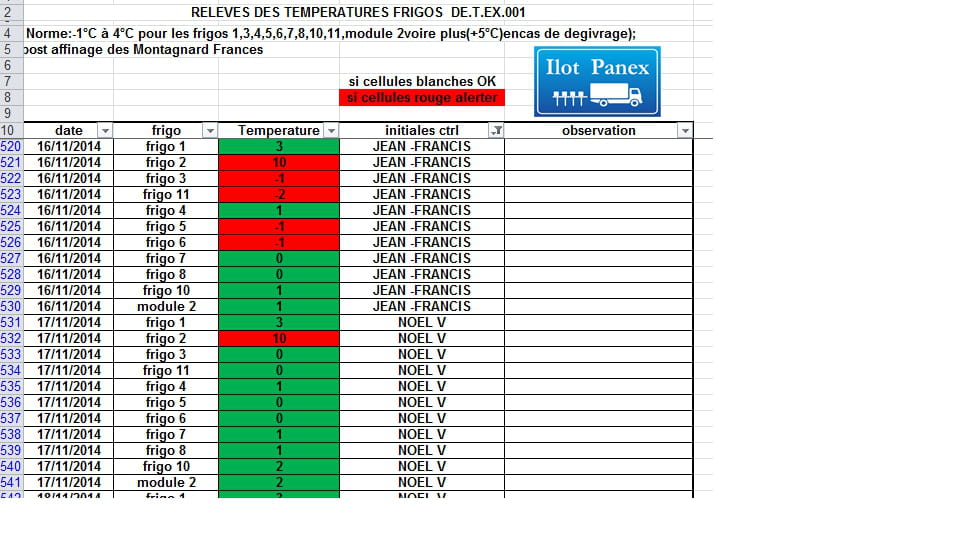
I would like the temperature in column I to display a red cell when the temperature is below 10 degrees but also when it is above 13 degrees. Furthermore, I would like this to apply only to fridge 2 which is mentioned in column H and not to the other fridges.
Here is the formula I have created without much success for now: =IF(AND($H11:$H13157="frigo 2",$I11:$I13157<10,$I11:$I13157>13),"TRUE","FALSE")
While waiting for your possible responses, I thank you in advance.
Best regards.
1 answer
-
ContributorHello
Conditional formatting by formula with this formula, it should work
=AND($H11="frigo 2",OR($I11<10,$I11>13))
In a CF, the IF is not needed and you just need to, after selecting the field to format, enter the formula corresponding to the 1st line in the CF window
regards
To err is human, to persist is diabolical
