
APPLIED PIRATE
SolvedHELLO, my antivirus AVAST eliminates at each opening of my inbox 2 malware sites oneahbutweha.com and faziburugetfem.com, which are hosted in CHROME applications HOW TO REMOVE THANKS
4 answers
-
and what if I uninstalled CHROME AND REINSTALLED IT IMMEDIATELY?
-
-
Moderator
You either reset Chrome manually or with ResetBrowser as indicated in my first message.
If you absolutely want to uninstall Chrome, do it with UNINSTALR.
And if that yields no result, run the FRST analysis and afterwards I’ll see what needs to be done because right now we’re talking in circles.
-
-
thank you, I think so too, but when I open the Chrome apps, you can't delete it because it is "OPEN" .......
-
ModeratorSee with FRST as Bazfile suggested earlier in reply <1>
Otherwise, for next time, Extensions (Browser Plugins) are in tab 6 of Reanimator (Browser Plugins)
https://forums.commentcamarche.net/forum/affich-38206831-alors-vous-voulez-supprimer-les-virus-vous-meme-comment
If you want, continue with Bazfile whom I salute, if he feels disposed to help you as always.
@+ on CCM
-
-
Moderator
Hi,
Just to add
It can also be a parasite extension in Chrome, not just nuisance notifications. -
Moderator
Hello .
These are nuisance notifications that you have saved in Google Chrome.
Two options are available to you.
- Either delete the nuisance notifications yourself, for this read this page and also this page.
Or manually reset Google Chrome or with Reset Browser.
- If it’s still the same, download FRST.
Once downloaded, save FRST to the desktop then right-click FRST and choose Run as administrator which yields the following:
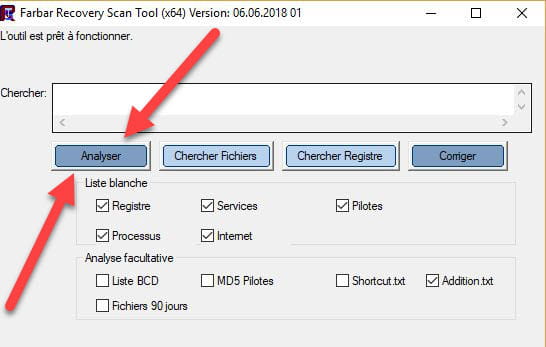

 Attend that the message the tool is ready to operate appears then click Analyze.
Attention, wait for the messages indicating that the analysis is complete to appear.
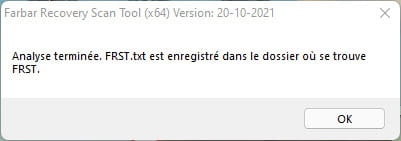

At the end of the analysis the two reports FRST and Addition will be on the desktop.

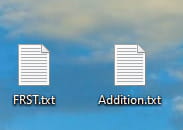

Upload FRST and ADDITION reports to https://pjjoint.malekal.com/.
Then paste the two links generated by https://pjjoint.malekal.com/ in your reply.
For your information :
 If opening FRST triggers a Microsoft Defender alert, do not worry, click on Additional information and then Run anyway, see below.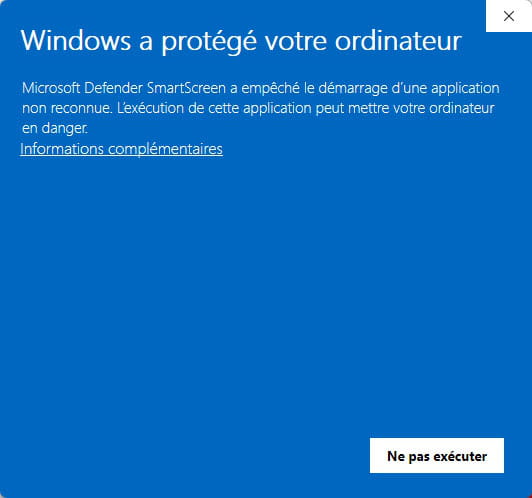


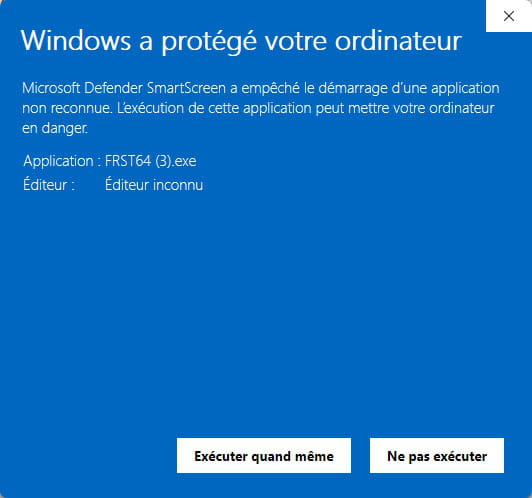
bazfile
Moderator/Security Contributor.
a hello, an answer, a thank you, always a pleasure.

