FileZilla usage for OVH - Access parameters?
Hello,
I just subscribed to an OVH plan.
I assume I can transfer files and create directories in my OVH space with FileZilla (as I did with my old Numericable personal pages).
Where can I find the HOST/Username/Password/Port values to provide FileZilla to access my space?
Thank you for your help.
Best regards.
Jean
5 answers
-
Hello,
These settings are emailed to the new subscriber who only has to enter them in Filezilla. -
@ Brucine
Thanks for the information.
Best regards.
Jean
-
Hello
I'm progressing but I have a complementary question:
I entered my settings in Filezilla and transferred some files into my OVH space.
But I couldn't find which address to use to view them (which username to put in front of my domain name).
Thanks for your help.
Kind regards.
Jean
-
I no longer have a website for a long time, so subject to.
If I recall correctly, the FTP client (here Filezilla) only allows transferring files in one direction or the other without viewing them on the remote site.
If I recall correctly, most browsers no longer allow opening directly via the FTP protocol.
You must then enter the URL of the document in http in your browser, or if not already done, set up with an appropriate Web editor a site whose pages will contain links to these files.
-
-
Hello
I have (since yesterday) a domain in OVH named jc4456.
With FileZilla I uploaded a file accesOVH.xht
In an HTML file on my PC I put a link with the address:
http://jc4456/accessOVH.xht
https://jc4456/accessOVH.xht
That doesn't work: incomplete address or site not yet created?
Thank you for your help.
Best regards.
Jean
-
Hello
@tld: thank you for your reply. Yes, there probably needs to be a ".fr" somewhere.
I haven't found the syntax to use to access the file: accessOVH.htx :
htps://.................???................................/accessOVH.htx
Thank you for your help.
Kind regards.
Jean
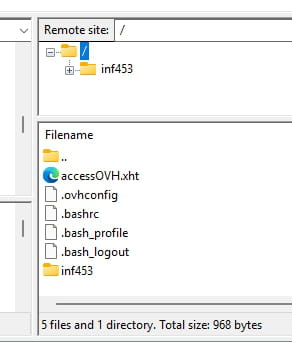
Below is the site listing by FileZilla.