Compare numbers from two arrays.
Hello everyone,
I have 2 arrays; I would like to compare them so I can know which numbers are present in both.
Attention . These are two fairly large arrays. The first contains numbers calculated according to a certain formula, and the second are the prime numbers from 1 to 100,000. So I would need a few solid lines of code.
With my thanks.
Tessel
8 answers
-
Hello,
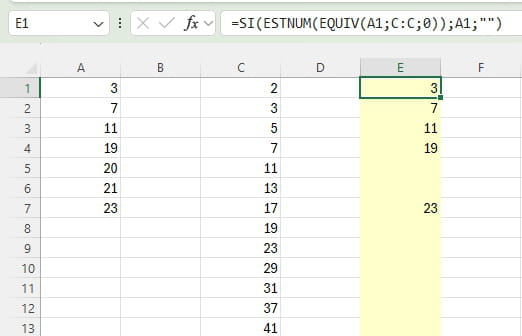
Maybe like this:
Daniel
-
Contributor
Hello Tessel.
Why do simple when you can do complicated?
The little formula from Daniel answers your need perfectly, without any need for lines of code at all.
My regards to you both.
Retirement is great! Especially in the Caribbean...
Raymond (INSA, AFPA) -
Hello Daniel,
A big thank you for your very quick response. But I’ve looked at it carefully and I do not understand it at all. Could you explain the functions and arguments to me? I’m familiar with the function IF(A;B;C), but not at all with the function Equiv(A;B1:B2;C)
Thanks for your advice
Hello Dear Raymond, I was thinking of you while sending my question; I was sure it would pique your curiosity. Thank you. I should add that my tables are quite large: 10x50 and 10x1000.
Tessel
-
Hello,
You just need to consult them.
The function searches for the value in cell A1 (then A2 downward, etc.) within the considered range, here column C, and returns the position if it exists.
Here A1 is found in C2, so the second row of column C, and the exact return (parameter 0) is 2: since this return is numeric the condition ISNUMBER returns the value of A1 which can only be a prime number; otherwise it would not be found in C.
If the number in A is not prime, it will not be found in C, the condition fails and it returns "" meaning nothing. -
-
-
Hello everyone,
In E1, the MATCH function searches for A1 in column C. If it finds it, the function returns the row number; otherwise, it returns #NA. I test the result with the ISNUMBER function. In our example, MATCH finds "3" in C2. I therefore enter A1 in E1. In E5, since 20 is not in the column C list, I enter nothing.
For complete help on MATCH, see this page:
https://support.microsoft.com/en-us/office/match-function
Daniel -
Now, if you want the results without blanks, use:
=IFERROR(INDEX(A:A;AGGREGATE(15;6;ROW($C$1:$C$50000)/ISNUMBER(MATCH($A$1:$A$8;$C$1:$C$50000;0));ROW(A1)));"")
to copy down:
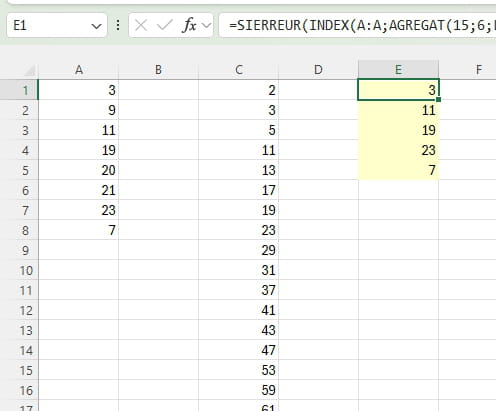
If you’d like explanations on the formula, say so.
Daniel
-
Hello everyone,
Which version of Excel are you working with?
Best regards -
Hello everyone,
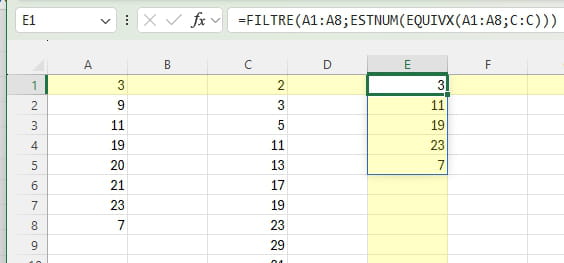
To continue the idea of DjiDji59430 and since you seem to have a recent version, try:
=FILTER(A1:A8;ISNUMBER(XLOOKUP(A1:A8;C:C)))
Daniel
-
Hello,
In addition to Daniel's formula, if your two tables have multiple columns, you can compare them at once with a single formula provided you have Excel Microsoft 365.
For example, if we have a first table in A1:J50, and the prime numbers in L1:U1000, we would combine the following formulas:
1/ DANSCOL puts all the cells from the first table into a single column (skipping empty cells)
=DANSCOL(A1:J50,1)
2/ COUNTIF counts how many times each number appears in the second table
=COUNTIF(L1:U1000,DANSCOL(A1:J50,1))
3/ FILTER keeps only the numbers found at least once, and UNIQUE removes duplicates
=UNIQUE(FILTER(DANSCOL(A1:J50,1),COUNTIF(L1:U1000,DANSCOL(A1:J50,1))>0,"None"))
The list of common numbers will display below the entered formula. Good luck!