
Audio Processing Object APO update failed?
kaneagle Posted messages 86300 Registration date Status Moderator Last intervention -
Hello,
For the past few days, Windows Update on my Windows 11 Home x64 25h2 has been suggesting an Audio Processing Object (APO) update.
I am testing several installations, with or without the basic updated drivers downloaded from the Asus website, for my PC built with an Asus Prime H670 Plus D4. Previously, I had never received this update in the past.
Have you encountered any issues with this update that Microsoft seems to be pushing, even if the basic drivers are not installed or are installed according to my tests?
Thank you very much for your feedback.
3 answers
-
Hello,
Press Windows + X
Device Manager
Go to audio, video and game controllers
Right-click on Audio Processing Object (APO)
Properties
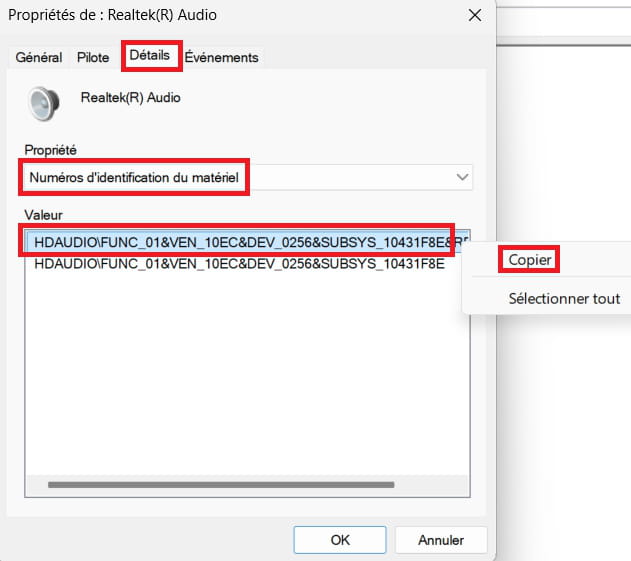
Details tab
In Property, select --> Hardware Ids
Right-click on the hardware id and copy
Paste this number in your next message.Example image:
---------------------------------------------------------------------------------------------------
What is the current date and version of the driver?
Example image: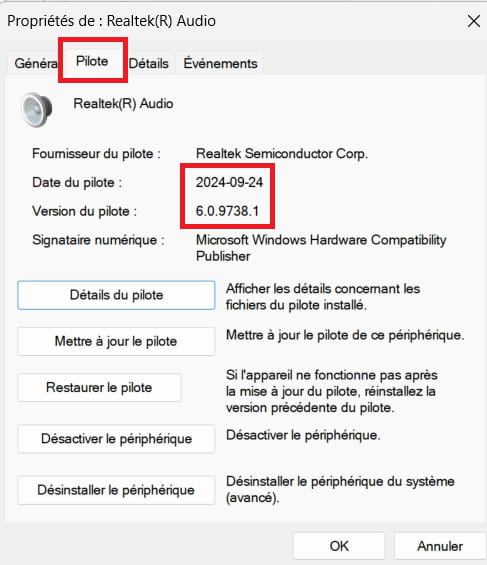
-
Hello,
From what I see on my end, the version is dated June 25, 2024. The driver version: 6.0.9700.1.
-
Equipment identification number?
