Cómo codificar en utf-8 un script.ps1 de PowerShell?
# Define la codificación de salida del terminal en UTF-8 $OutputEncoding = [System.Text.Encoding]::UTF8 [Console]::InputEncoding = [System.Text.Encoding]::UTF8 # Define la ubicación por defecto $ubicacionPorDefecto = "C:\wamp\www" # Pide al usuario la ubicación y el nombre de la carpeta $ubicacion = Read-Host "Introduce la ubicación de la carpeta (presiona Enter para usar $ubicacionPorDefecto)" if ([string]::IsNullOrWhiteSpace($ubicacion)) { $ubicacion = $ubicacionPorDefecto } $nombreCarpeta = Read-Host "Introduce el nombre de tu sitio" if ([string]::IsNullOrWhiteSpace($nombreCarpeta)) { Write-Host "El nombre de la carpeta no puede estar vacío. Operación cancelada." -ForegroundColor Red exit } $carpetaCompleta = Join-Path -Path $ubicacion -ChildPath $nombreCarpeta # Verifica si la carpeta ya existe if (Test-Path -Path $carpetaCompleta) { Write-Host "La carpeta '$carpetaCompleta' ya existe. Operación cancelada." -ForegroundColor Red exit } # Crea las carpetas New-Item -ItemType Directory -Path $carpetaCompleta | Out-Null New-Item -ItemType Directory -Path (Join-Path -Path $carpetaCompleta -ChildPath "css") | Out-Null New-Item -ItemType Directory -Path (Join-Path -Path $carpetaCompleta -ChildPath "js") | Out-Null # Contenido de los archivos $htmlContent = @" <!DOCTYPE html> <html lang="es"> <head> <meta charset="utf-8"> <meta name="viewport" content="width=device-width, initial-scale=1.0"> <link rel="stylesheet" href="css/style.css"> <script src="js/date.time.js" defer></script> <title>Mi Sitio</title> </head> <body> <header> <div class="date"></div> <h1><a href="#">Título del sitio</a></h1> <div class="time"></div> </header> <main> </main> <footer> © Copyright modelo (2023 - <span class="copy"></span>). Todos los derechos reservados </footer> </body> </html> "@ $cssContent = @" * { margin: 0; padding: 0; box-sizing: border-box; font-family: 'Roboto', sans-serif; text-decoration: none; } ::-webkit-scrollbar { display: none; } html { width: 100%; } body { width: 100%; min-height: 100vh; display: flex; flex-direction: column; background-color: #222; color: #fff; } header { padding: 10px; display: flex; justify-content: space-between; align-items: center; color: #fff; border-bottom: 2px solid #fff; } header .date, header .time { margin-top: 5px; margin-left: 5px; font-style: italic; } header h1 { font-family: 'Operator Mono Lig Medium', monospace; font-style: italic; color: #fff; } header h1 a { font-family: inherit; font-style: inherit; font-weight: 400; color: inherit; text-align: center; } header h1 a:hover { opacity: 0.5; } header .time { margin-right: 5px; } main { margin-top: 40px; display: flex; justify-content: center; flex: 1; } footer { padding: 10px; display: flex; justify-content: center; font-family: 'Operator Mono Lig Medium', monospace; font-style: italic; color: #fff; border-top: 2px solid #fff; } footer span { font-family: 'Roboto', sans-serif; font-size: 1rem; } "@ $jsContent = @" // Fecha, hora, copyright const date = document.querySelector('.date') const time = document.querySelector('.time') const copy = document.querySelector('.copy') // Fecha de hoy const toDay = new Date().toLocaleDateString('es-ES', { weekday: "long", day: "numeric", month: "long", year: "numeric" }) // Copyright copy.textContent = new Date().getFullYear() // Fecha date.textContent = toDay // Hora const dspTime = () => { const now = new Date() let h = now.getHours() let m = now.getMinutes().toString().padStart(2, '0') let s = now.getSeconds().toString().padStart(2, '0') let a = h > 12 ? 'pm' : 'am' h = h % 12 time.textContent = h + ':' + m + ':' + s + ' ' + a } dspTime() setInterval(dspTime, 1000) "@ # Escribe el contenido en los archivos con la codificación UTF-8 Set-Content -Path (Join-Path -Path $carpetaCompleta -ChildPath "index.html") -Value $htmlContent -Encoding UTF8 Set-Content -Path (Join-Path -Path $carpetaCompleta -ChildPath "css\style.css") -Value $cssContent -Encoding UTF8 Set-Content -Path (Join-Path -Path $carpetaCompleta -ChildPath "js\date.time.js") -Value $jsContent -Encoding UTF8 Write-Host "¡El esqueleto de su sitio se ha creado con éxito en la carpeta '$carpetaCompleta'!" -ForegroundColor Green Cuando una palabra tiene una letra como "é", en el archivo fuente index.html la letra se convierte en "
# Define la codificación de salida del terminal en UTF-8
$OutputEncoding = [System.Text.Encoding]::UTF8
[Console]::InputEncoding = [System.Text.Encoding]::UTF8
# Define la ubicación por defecto
$ubicacionPorDefecto = "C:\wamp\www"
# Pide al usuario la ubicación y el nombre de la carpeta
$ubicacion = Read-Host "Introduce la ubicación de la carpeta (presiona Enter para usar $ubicacionPorDefecto)"
if ([string]::IsNullOrWhiteSpace($ubicacion)) {
$ubicacion = $ubicacionPorDefecto
}
$nombreCarpeta = Read-Host "Introduce el nombre de tu sitio"
if ([string]::IsNullOrWhiteSpace($nombreCarpeta)) {
Write-Host "El nombre de la carpeta no puede estar vacío. Operación cancelada." -ForegroundColor Red
exit
}
$carpetaCompleta = Join-Path -Path $ubicacion -ChildPath $nombreCarpeta
# Verifica si la carpeta ya existe
if (Test-Path -Path $carpetaCompleta) {
Write-Host "La carpeta '$carpetaCompleta' ya existe. Operación cancelada." -ForegroundColor Red
exit
}
# Crea las carpetas
New-Item -ItemType Directory -Path $carpetaCompleta | Out-Null
New-Item -ItemType Directory -Path (Join-Path -Path $carpetaCompleta -ChildPath "css") | Out-Null
New-Item -ItemType Directory -Path (Join-Path -Path $carpetaCompleta -ChildPath "js") | Out-Null
# Contenido de los archivos
$htmlContent = @"
<!DOCTYPE html>
<html lang="es">
<head>
<meta charset="utf-8">
<meta name="viewport" content="width=device-width, initial-scale=1.0">
<link rel="stylesheet" href="css/style.css">
<script src="js/date.time.js" defer></script>
<title>Mi Sitio</title>
</head>
<body>
<header>
<div class="date"></div>
<h1><a href="#">Título del sitio</a></h1>
<div class="time"></div>
</header>
<main>
</main>
<footer>
© Copyright modelo (2023 - <span class="copy"></span>). Todos los derechos reservados
</footer>
</body>
</html>
"@
$cssContent = @"
* {
margin: 0;
padding: 0;
box-sizing: border-box;
font-family: 'Roboto', sans-serif;
text-decoration: none;
}
::-webkit-scrollbar {
display: none;
}
html {
width: 100%;
}
body {
width: 100%;
min-height: 100vh;
display: flex;
flex-direction: column;
background-color: #222;
color: #fff;
}
header {
padding: 10px;
display: flex;
justify-content: space-between;
align-items: center;
color: #fff;
border-bottom: 2px solid #fff;
}
header .date, header .time {
margin-top: 5px;
margin-left: 5px;
font-style: italic;
}
header h1 {
font-family: 'Operator Mono Lig Medium', monospace;
font-style: italic;
color: #fff;
}
header h1 a {
font-family: inherit;
font-style: inherit;
font-weight: 400;
color: inherit;
text-align: center;
}
header h1 a:hover {
opacity: 0.5;
}
header .time {
margin-right: 5px;
}
main {
margin-top: 40px;
display: flex;
justify-content: center;
flex: 1;
}
footer {
padding: 10px;
display: flex;
justify-content: center;
font-family: 'Operator Mono Lig Medium', monospace;
font-style: italic;
color: #fff;
border-top: 2px solid #fff;
}
footer span {
font-family: 'Roboto', sans-serif;
font-size: 1rem;
}
"@
$jsContent = @"
// Fecha, hora, copyright
const date = document.querySelector('.date')
const time = document.querySelector('.time')
const copy = document.querySelector('.copy')
// Fecha de hoy
const toDay = new Date().toLocaleDateString('es-ES', {
weekday: "long",
day: "numeric",
month: "long",
year: "numeric"
})
// Copyright
copy.textContent = new Date().getFullYear()
// Fecha
date.textContent = toDay
// Hora
const dspTime = () => {
const now = new Date()
let h = now.getHours()
let m = now.getMinutes().toString().padStart(2, '0')
let s = now.getSeconds().toString().padStart(2, '0')
let a = h > 12 ? 'pm' : 'am'
h = h % 12
time.textContent = h + ':' + m + ':' + s + ' ' + a
}
dspTime()
setInterval(dspTime, 1000)
"@
# Escribe el contenido en los archivos con la codificación UTF-8
Set-Content -Path (Join-Path -Path $carpetaCompleta -ChildPath "index.html") -Value $htmlContent -Encoding UTF8
Set-Content -Path (Join-Path -Path $carpetaCompleta -ChildPath "css\style.css") -Value $cssContent -Encoding UTF8
Set-Content -Path (Join-Path -Path $carpetaCompleta -ChildPath "js\date.time.js") -Value $jsContent -Encoding UTF8
Write-Host "¡El esqueleto de su sitio se ha creado con éxito en la carpeta '$carpetaCompleta'!" -ForegroundColor Green
4 respuestas
-
Buenas noches,
Ver aquí !
Foro CCM - Carta - Respeto a los demás
Respeto a los demás
El foro del sitio CommentCaMarche pone en contacto a personas de diferentes entornos, tendiendo hacia un solo objetivo: la ayuda informática. Así, todas las personas que contribuyen a esta ayuda son usuarios voluntarios y gratuitos.
Cortesía
Por lo tanto, es indispensable utilizar el foro con el mayor respeto hacia los usuarios. Cada nuevo mensaje deberá ser lo más cortés posible. La cortesía se traduce todos los días mediante el uso de ciertos términos como hola, adiós, bienvenido, por favor, o gracias, y por actitudes específicas. Esta regla de conducta es válida en la vida cotidiana pero también en CCM (CommentCaMarche).
Foro CCM - Carta - Respeto a los demás
-
¿Puedo darle un +10 a la respuesta en lugar de un +1? :)
-
11
-
Hola,
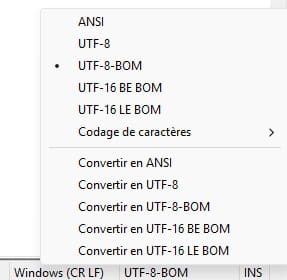
El script ps1 de PowerShell debe guardarse con la codificación de caracteres UTF-8 con BOM (UTF-8-BOM).
Por ejemplo en Notepad++: