Comment encoder un script.ps1 en utf-8 ?
Jean20B Posted messages 1861 Registration date Status Member Last intervention -
# Defines the terminal output encoding as UTF-8 $OutputEncoding = [System.Text.Encoding]::UTF8 [Console]::InputEncoding = [System.Text.Encoding]::UTF8 # Defines the default location $defaultLocation = "C:\wamp\www" # Asks the user for the folder location and name $location = Read-Host "Enter the folder location (press Enter to use $defaultLocation)" if ([string]::IsNullOrWhiteSpace($location)) { $location = $defaultLocation } $folderName = Read-Host "Enter the name of your site" if ([string]::IsNullOrWhiteSpace($folderName)) { Write-Host "The folder name cannot be empty. Operation cancelled." -ForegroundColor Red exit } $fullFolder = Join-Path -Path $location -ChildPath $folderName # Checks if the folder already exists if (Test-Path -Path $fullFolder) { Write-Host "The folder '$fullFolder' already exists. Operation cancelled." -ForegroundColor Red exit } # Creates the folders New-Item -ItemType Directory -Path $fullFolder | Out-Null New-Item -ItemType Directory -Path (Join-Path -Path $fullFolder -ChildPath "css") | Out-Null New-Item -ItemType Directory -Path (Join-Path -Path $fullFolder -ChildPath "js") | Out-Null # File contents $htmlContent = @" <!DOCTYPE html> <html lang="en"> <head> <meta charset="utf-8"> <meta name="viewport" content="width=device-width, initial-scale=1.0"> <link rel="stylesheet" href="css/style.css"> <script src="js/date.time.js" defer></script> <title>My Site</title> </head> <body> <header> <div class="date"></div> <h1><a href="#">Site Title</a></h1> <div class="time"></div> </header> <main> </main> <footer> © Copyright template (2023 - <span class="copy"></span>). All rights reserved </footer> </body> </html> "@ $cssContent = @" * { margin: 0; padding: 0; box-sizing: border-box; font-family: 'Roboto', sans-serif; text-decoration: none; } ::-webkit-scrollbar { display: none; } html { width: 100%; } body { width: 100%; min-height: 100vh; display: flex; flex-direction: column; background-color: #222; color: #fff; } header { padding: 10px; display: flex; justify-content: space-between; align-items: center; color: #fff; border-bottom: 2px solid #fff; } header .date, header .time { margin-top: 5px; margin-left: 5px; font-style: italic; } header h1 { font-family: 'Operator Mono Lig Medium', monospace; font-style: italic; color: #fff; } header h1 a { font-family: inherit; font-style: inherit; font-weight: 400; color: inherit; text-align: center; } header h1 a:hover { opacity: 0.5; } header .time { margin-right: 5px; } main { margin-top: 40px; display: flex; justify-content: center; flex: 1; } footer { padding: 10px; display: flex; justify-content: center; font-family: 'Operator Mono Lig Medium', monospace; font-style: italic; color: #fff; border-top: 2px solid #fff; } footer span { font-family: 'Roboto', sans-serif; font-size: 1rem; } "@ $jsContent = @" // Date, time, copyright const date = document.querySelector('.date') const time = document.querySelector('.time') const copy = document.querySelector('.copy') // Today's date const toDay = new Date().toLocaleDateString('en-US', { weekday: "long", day: "numeric", month: "long", year: "numeric" }) // Copyright copy.textContent = new Date().getFullYear() // Date date.textContent = toDay // Time const dspTime = () => { const now = new Date() let h = now.getHours() let m = now.getMinutes().toString().padStart(2, '0') let s = now.getSeconds().toString().padStart(2, '0') let a = h > 12 ? 'pm' : 'am' h = h % 12 time.textContent = h + ':' + m + ':' + s + ' ' + a } dspTime() setInterval(dspTime, 1000) "@ # Writes content to the files with UTF-8 encoding Set-Content -Path (Join-Path -Path $fullFolder -ChildPath "index.html") -Value $htmlContent -Encoding UTF8 Set-Content -Path (Join-Path -Path $fullFolder -ChildPath "css\style.css") -Value $cssContent -Encoding UTF8 Set-Content -Path (Join-Path -Path $fullFolder -ChildPath "js\date.time.js") -Value $jsContent -Encoding UTF8 Write-Host "The skeleton of your site has been successfully created in the folder '$fullFolder' !" -ForegroundColor Green When a word contains a letter like "é", in the source index.html the letter becomes "
# Defines the terminal output encoding as UTF-8
$OutputEncoding = [System.Text.Encoding]::UTF8
[Console]::InputEncoding = [System.Text.Encoding]::UTF8
# Defines the default location
$defaultLocation = "C:\wamp\www"
# Asks the user for the folder location and name
$location = Read-Host "Enter the folder location (press Enter to use $defaultLocation)"
if ([string]::IsNullOrWhiteSpace($location)) {
$location = $defaultLocation
}
$folderName = Read-Host "Enter the name of your site"
if ([string]::IsNullOrWhiteSpace($folderName)) {
Write-Host "The folder name cannot be empty. Operation cancelled." -ForegroundColor Red
exit
}
$fullFolder = Join-Path -Path $location -ChildPath $folderName
# Checks if the folder already exists
if (Test-Path -Path $fullFolder) {
Write-Host "The folder '$fullFolder' already exists. Operation cancelled." -ForegroundColor Red
exit
}
# Creates the folders
New-Item -ItemType Directory -Path $fullFolder | Out-Null
New-Item -ItemType Directory -Path (Join-Path -Path $fullFolder -ChildPath "css") | Out-Null
New-Item -ItemType Directory -Path (Join-Path -Path $fullFolder -ChildPath "js") | Out-Null
# File contents
$htmlContent = @"
<!DOCTYPE html>
<html lang="en">
<head>
<meta charset="utf-8">
<meta name="viewport" content="width=device-width, initial-scale=1.0">
<link rel="stylesheet" href="css/style.css">
<script src="js/date.time.js" defer></script>
<title>My Site</title>
</head>
<body>
<header>
<div class="date"></div>
<h1><a href="#">Site Title</a></h1>
<div class="time"></div>
</header>
<main>
</main>
<footer>
© Copyright template (2023 - <span class="copy"></span>). All rights reserved
</footer>
</body>
</html>
"@
$cssContent = @"
* {
margin: 0;
padding: 0;
box-sizing: border-box;
font-family: 'Roboto', sans-serif;
text-decoration: none;
}
::-webkit-scrollbar {
display: none;
}
html {
width: 100%;
}
body {
width: 100%;
min-height: 100vh;
display: flex;
flex-direction: column;
background-color: #222;
color: #fff;
}
header {
padding: 10px;
display: flex;
justify-content: space-between;
align-items: center;
color: #fff;
border-bottom: 2px solid #fff;
}
header .date, header .time {
margin-top: 5px;
margin-left: 5px;
font-style: italic;
}
header h1 {
font-family: 'Operator Mono Lig Medium', monospace;
font-style: italic;
color: #fff;
}
header h1 a {
font-family: inherit;
font-style: inherit;
font-weight: 400;
color: inherit;
text-align: center;
}
header h1 a:hover {
opacity: 0.5;
}
header .time {
margin-right: 5px;
}
main {
margin-top: 40px;
display: flex;
justify-content: center;
flex: 1;
}
footer {
padding: 10px;
display: flex;
justify-content: center;
font-family: 'Operator Mono Lig Medium', monospace;
font-style: italic;
color: #fff;
border-top: 2px solid #fff;
}
footer span {
font-family: 'Roboto', sans-serif;
font-size: 1rem;
}
"@
$jsContent = @"
// Date, time, copyright
const date = document.querySelector('.date')
const time = document.querySelector('.time')
const copy = document.querySelector('.copy')
// Today's date
const toDay = new Date().toLocaleDateString('en-US', {
weekday: "long",
day: "numeric",
month: "long",
year: "numeric"
})
// Copyright
copy.textContent = new Date().getFullYear()
// Date
date.textContent = toDay
// Time
const dspTime = () => {
const now = new Date()
let h = now.getHours()
let m = now.getMinutes().toString().padStart(2, '0')
let s = now.getSeconds().toString().padStart(2, '0')
let a = h > 12 ? 'pm' : 'am'
h = h % 12
time.textContent = h + ':' + m + ':' + s + ' ' + a
}
dspTime()
setInterval(dspTime, 1000)
"@
# Writes content to the files with UTF-8 encoding
Set-Content -Path (Join-Path -Path $fullFolder -ChildPath "index.html") -Value $htmlContent -Encoding UTF8
Set-Content -Path (Join-Path -Path $fullFolder -ChildPath "css\style.css") -Value $cssContent -Encoding UTF8
Set-Content -Path (Join-Path -Path $fullFolder -ChildPath "js\date.time.js") -Value $jsContent -Encoding UTF8
Write-Host "The skeleton of your site has been successfully created in the folder '$fullFolder' !" -ForegroundColor Green
4 answers
-
Good evening,
See here !
CCM Forum - Charter - Respect for Others
Respect for Others
The forum of the site CommentCaMarche connects people from different backgrounds, all striving towards a single goal: computer assistance. Thus, all individuals contributing to this aid are volunteer and unpaid users.
Politeness
It is therefore essential to use the forum with the utmost respect towards other users. Each new message should be as courteous as possible. Politeness is expressed daily through the use of certain terms such as hello, goodbye, welcome, please, or thank you, along with specific attitudes. This code of conduct applies in everyday life as well as on CCM (CommentCaMarche).
CCM Forum - Charter - Respect for Others
-
-
-
Hello,
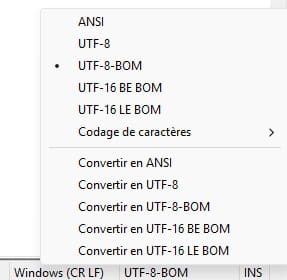
The PowerShell ps1 script must be saved with UTF-8 with BOM (UTF-8-BOM) character encoding.
For example in Notepad++: