
ACCESS - Issue with auto-increment primary key when adding a table/query
Hello,
I've been discovering Access since yesterday and I'm really not used to it.
I have several identical tables from different sources. A primary key via an auto ID number has been generated for each of them, so obviously, we find the same primary key multiple times when trying to merge them. There is a DBMS but none of these tables have a relationship based on that primary key. In order to add all these tables, I first created a union query, then an append query. That's where it gets stuck.
Even when I remove the primary key from the field, or even when I delete all the ID fields, I can't add the results of my query to my table due to key violation reasons (despite attempts to save).
Isn't there a simple way to add this data either by automatically generating a unique auto number for the added records or by forcing the possibility of duplicates, even if I reset everything at the end, since the primary key is not used for any relationship?
Right now I'm at the point of exporting my query to Excel, filling it with a sequential number starting from the next number in my main table, and frankly, it's super tedious.
Thank you very much for your help! I'm useless and I'm not supposed to be!
Configuration: Windows / Edge 101.0.1210.53
I've been discovering Access since yesterday and I'm really not used to it.
I have several identical tables from different sources. A primary key via an auto ID number has been generated for each of them, so obviously, we find the same primary key multiple times when trying to merge them. There is a DBMS but none of these tables have a relationship based on that primary key. In order to add all these tables, I first created a union query, then an append query. That's where it gets stuck.
Even when I remove the primary key from the field, or even when I delete all the ID fields, I can't add the results of my query to my table due to key violation reasons (despite attempts to save).
Isn't there a simple way to add this data either by automatically generating a unique auto number for the added records or by forcing the possibility of duplicates, even if I reset everything at the end, since the primary key is not used for any relationship?
Right now I'm at the point of exporting my query to Excel, filling it with a sequential number starting from the next number in my main table, and frankly, it's super tedious.
Thank you very much for your help! I'm useless and I'm not supposed to be!
Configuration: Windows / Edge 101.0.1210.53
7 answers
-
ModeratorHello,
I don't use Access at all, it's just a suggestion on the principle.
If your tables to merge are of the type (id, field1, field2, ...), you will create a new table with the same fields but you need to specify that id is of type auto-increment, so the system will insert and generate it. Then you fill this table by specifying the fields, except for id, withinsert tfusion (field1, field2) select field1, field2 from t1 union select field1, field2 from t2 union ...
Or since you don't need the id, you can create a table without a key (field1, field2) and fill it with the same query.
-
Hello,
here is what you need to do in order:
1) Create tables
as an example for a stock management database, I created a table and saved it directly under
the name: T_Categories

here are the parameters for the field ID_Categories
Please note that I'm avoiding using accents in both the names of my tables and the names of the fields; this is intentional for better readability of the font, with or without serifs.
Once my first table is created, I will change the NomCategorie field to make it a dropdown list.
To do this, I select the field highlighted in yellow
and in the field parameters, I go to the choices list tab and expand the list like this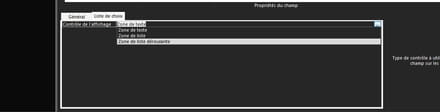
Then, still in the field parameters, in the dropdown properties,
I go to the "Source Origin" property, change it to 'value list' in "content," and in the right cell, I enter my list data, noting that these must be separated by a semicolon (;):
In this table, I can finally put or add data, for example, in the description field.
Then I create my second table and save it directly under the name T_objets

I switch to data mode and add some data

2) Create relationships between these tables. Be careful not to confuse relationships and queries; they have different roles.
To create a relationship between two tables, you need two tables, but especially, one of the two tables must contain an additional field that we add at the end of the table, and the data type must be of the same value; for example, you cannot use text in a relationship with numeric data (numbers).
Please note that in my T_Objets table, I have added a field "ID_categories" whose data type is "Numeric." You can add it either directly to your table in design mode or from the relationship tool; you just need to select a table (here T_objet), right-click, and choose design mode.
To create a relationship, your tables should look like this:
Here, the relationship between the two tables indicates that a category can contain at least 1 to several objects
MLD = Logical Data Model
MCD = Conceptual Data Model
see: Merise method
I create the relationship between the ID_Categories field in the T_Categories table and the ID_categories field in the T_Objets table
I exit and save the relationship
and I return to the T_Categories table, which I open in "datasheet" mode
In my example, there are three categories: GrosElectro, PetitsElectro, and Meubles
In the T_objets table, my first object is a dining table, so it is categorized under Meubles
For the T_categories table, I decided that GrosElectro is in the first record of the ID_Catégories field; since this is an indexed and auto-increment field, it will receive ID 1, PetitElectro will have 2 in the ID field, and Meubles will have 3 in the ID field of the T_Categories table.
I hope my explanation is clear to you as it is not easy to define
So I return to my T_Categories table, and I can then see a small box with a +; if I click on it, I will open the T_Objets table and see all the objects that belong to the Meubles category, for example, by row
Please note that I clicked on the + of the third row of your T_Categories table, and thus I can see the data related to ID 3, whose value is: Meubles.
3) Create one or more queries (queries allow you to search, sort through tables)
4) Create one or more forms and see sub-forms
However, if you import tables, when choosing to create a primary key, I suggest that you choose the ID field yourself because if you do it automatically, the ID field will be added to your table, which may already have one.
-
@jee pee:
Thank you very much for your response, I tried to do it without the ID indeed but it refuses if the numbers and fields are not strictly identical :(
@blackmefias:
Thank you very much for your response, that is precisely the problem: I cannot start from a new table and recreate everything. There is an Access database with all the tables, all the relationships, and auto-increment ID numbers as primary keys that I cannot change the status of (with duplicates, removal of the key). In fact, the company for which I just started this new job has simply duplicated an Access database with lots of tables, lots of relationships, lots of integrity rules, and everything needs to be compiled. Thank you anyway for the care you took in the description, it will be very helpful for me moving forward and in my learning of Access!-
To get started with Access, I suggest you visit this site grenier.self-access.com
-
-
-
Thank you for the website!
-
@yg_be hello!
I have several Access databases with the same structure (tables, forms, queries, relationships). The problem is that there are tables to be merged containing auto-number primary keys and secondary keys. The operations performed:
1. opening one of the databases
2. import of all other tables from the other databases
3. union of the imported tables with identical structures (sometimes it malfunctioned due to a missing field, fixed)
4. adding this union to the existing "welcome" table for each of the tables = BIG FAIL due to the auto number
5. Removing the primary key from the query and then adding it = FAIL
Removing the ID field completely and then adding = FAIL
Attempting to modify the ID field of the "welcome" table - removing primary key and/or deleting the ID field (given that this field is not used in ANY relationship! apparently)
FAIL FAIL FAIL
6. Exporting queries to Excel, manually incrementing the ID, importing into the database, then adding table OK, for several tables 2 with only one record causing a problem, and on the other hand, a table completely KO with 964 records in FAIL out of 3297.
7. Unable to open one of the forms, the parameter of the property ParentFields is the source of the following error a problem occurred during communication between Microsoft Access and the OLE server or the ActiveX control. -
The table structures are identical; what's important is that they all have an auto-increment ID, the rest is fine.
For the queries, it's UNION, and then INSERT INTO.
The error messages "XXX records could not be added due to key violation"
I managed to integrate all of them except for the last table where I'm encountering many rejected records.
And the last problem I can't resolve is opening the form "The property parameter 'ChampsPères' is causing the following error: a problem occurred during communication between Microsoft Access and the OLE server or the ActiveX control" => "the expression on open entered as a parameter for the event property is causing an error." -
Sorry, I don't understand. I'm just doing simple adds and unions on the tables that I previously imported into my database, a simple insert into and union.



