Ghost Thunderbird data, how to view/delete?
SolvedHello,
I have a space issue on my internal hard drive, by default (C:). I use WinDirStat to visualize the installed elements and contents on the drive, and it presents them as blocks. The bigger the block, the more disk space it takes.
And now I see , still around 20GB. When I go through my trash bins (several configured accounts) in my email client, there isn’t much there, and what remains clearly cannot account for 20GB. So it would be some kind of past trace, something not visible.
There is the block’s path on my computer, which shows that it is indeed Thunderbird, but I’m afraid to delete it because I don’t know if it will corrupt anything, and above all I’d like to know what’s inside before deleting it.
I’d really like to recover these 20GB because I’m starting to run out of space.
Could you please help me, please? Thank you.
4 answers
-
 Moderator
Hello,
Trash on Thunderbird is the file for the Trash, present for each mailbox in the local profile storage.
Deleting messages from the trash does not shrink the file; it can grow, but to make it shrink you must run a specific operation, compacting. You can trigger the operation by right-clicking on the trash, or better, globally for each mailbox, because likewise a Inbox or Sent folder will grow but not shrink if you move or delete messages.
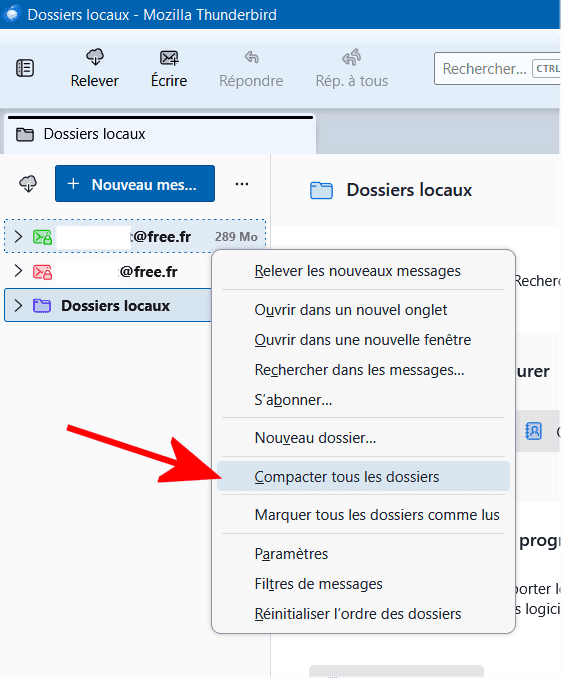
On a very large volume, very let Thunderbird work, the compacting could take a long time.
-
Hello,
Thank you for your reply.
I performed the cleanup of my Recycle Bins (2 accounts, not knowing which one contains the 20GB block), but I didn't see any message, no task progress, and regarding free space on C:, I’m still at the same point.
Would simply deleting (and naively?) the 20GB file be dangerous? Do I risk losing data, knowing that the little that remains in my Recycle Bins, by definition, is destined to be deleted someday?
-
-
Moderator
Hello,
I know TreeSize Free better than WinDirStat
With WinDirStat, Recycle Bin, is it a folder?
In %AppData% (Roaming) is Thunderbird’s profile (which I don’t use)
You may perhaps delete the cache in %LocalAppData% (Local) Mozilla\Thunderbird
-
For disk cleanup
You can start by deleting everything in the folder
C:\Windows\SoftwareDistribution\Download
You can right-click the Start button, Admin Terminal and enter these two DISM commandsdism /online /Cleanup-Image /AnalyzeComponentStore
dism /online /Cleanup-Image /StartComponentCleanup
Next, in the search area type Disk Cleanup and choose > C:
You will be able to choose to clean "System files", "Previous Windows installations" if present, as well as everything else.
Configure your Internet browser so that it downloads to a folder on D: if there is a D drive or partition rather than to your C:\Users\<yourname>\Downloads directory</yourname>
You can relocate elsewhere on D:\ or on an external drive what is in your personal subfolders of C:\Users\<yourname>\...</yourname>
TreeSize Free can help see what takes up the most space
Clean up afterwards with:
Wise Disk Cleaner
https://www.commentcamarche.net/telecharger/utilitaires/24193-wise-disk-cleaner/ATF-Cleaner
Then right-click This PC > Properties > System Protection
Or use "Search" for systempropertiesprotection.exe
Select C:\
Configure > Delete
Go back > Create
-
Hello,
I tried TreeSize, but since I’m not familiar with it, I find the presentation quite messy, so I didn’t understand the result at all. ^^
"Trash" is , I don’t think I saw any extension on its name, unlike the other *.msf files in the folder.
For the address %LocalAppData% (Local) Mozilla, I only have Firefox, zero Thunderbird folder. And for %LocalAppData% (Local) Thunderbird, the folder weighs only 500MB, far from the 20GB undesirable.
The cleanup:
- Regarding C:\Windows\SoftwareDistribution\Download, the folder is only 9.37MB. But I deleted it.
- "Terminal (Admin)" (for me it was "Windows PowerShell (Admin)"), I don’t know what you want me to do but I trust you. Performed for both entries.
- "Disk Cleanup", done. I also deleted the old Windows restore points. But in terms of space gain, I didn’t notice any.
But basically you’re helping me clean up all the leftovers around this 20GB Thunderbird block, but without ever touching that one? The side stuff is fine, it’s useful, thank you, but it won’t solve my problem of the big block.
The LDLC diagnostic report states "The 20GB in the trash is the trash of the Thunderbird mail, it’s a local copy of the account’s trash folder that was synchronized offline."
But they didn’t tell me how to view its contents or how to delete it. They told me they could do it for me, but I replied that if it’s just clicking "delete," I could do that, but I would have liked to see what it contained first. -
@vegansound
Hello @fabul, I don't know if you saw my response?
-
-
Moderator
In which directory is this file exactly? It would be interesting to see its last modification date/time to verify that it is active. Like:
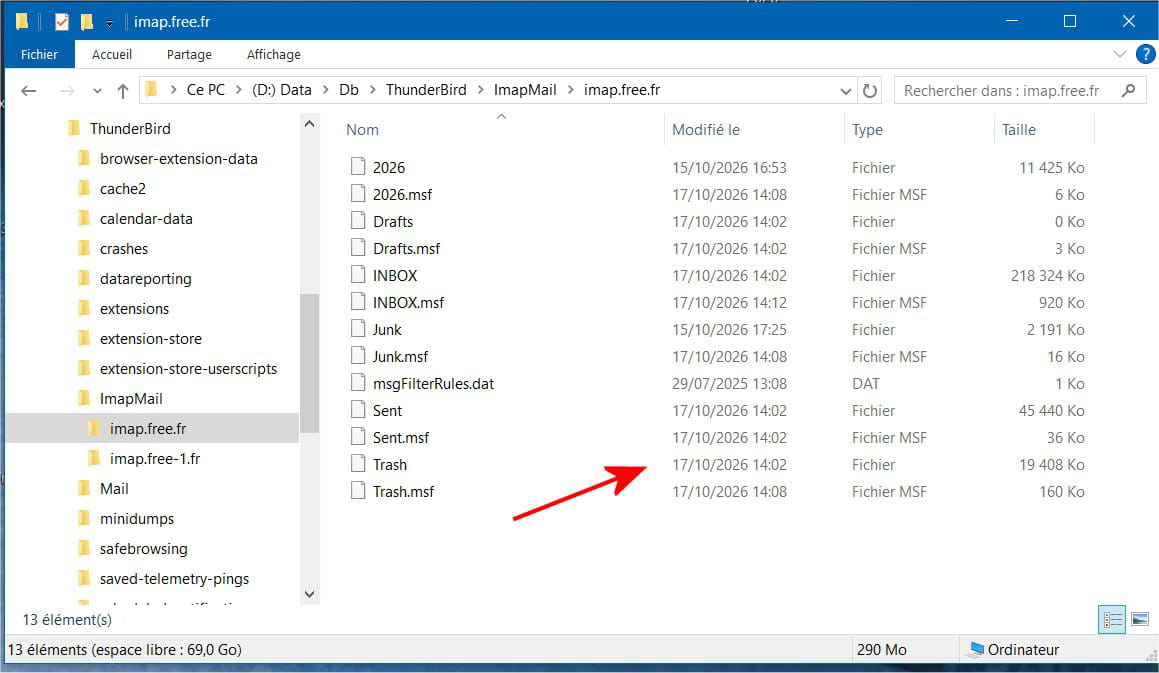
It could be an disconnected file, or an old account, ...
If it is in a subdirectory ImapMail, for IMAP accounts, it should be able to be deleted. In fact, in principle you can delete, if they are indeed active and operational, all subdirectories of ImapMail, there is one per account. Since when reconnecting everything is reloaded from the mail server used.
In a subdirectory of Mail it would be more delicate. There are POP3 accounts and local archives accounts and folders.
Of course for manipulations of this type I would make a backup of the entire Thunderbird profile first, as I do from time to time, my Thunderbird profile is positioned on my D: drive to avoid the system partition.
-
Hello,
The file is located in the folder "C:\Users\XXX\AppData\Roaming\Thunderbird\Profiles\q07o0ohg.default-release\ImapMail\ssl0.ovh.net\[Gmail].sbd". And indeed it seems active because I’m posting this message now, 5:12 PM, and the file was "used" on the same day at 2:40 PM, and it seems to have taken up an additional 200 MB.
I noticed something. When I search for the file among the folders, after a while I reach the Thunderbird folder (the one in the path above), and inside there are two folders, profiles: "pw5zn6ws.default" and "q07o0ohg.default-release". It is in the second that the large file is found, but its name ends with "-release", not the other one; isn’t that a clue? Or is that completely normal?
Also note that in my Thunderbird I have 3 different accounts, and only two profiles appear — is that normal too?
I also just noticed that WinDirStat offers these options when you right-click a file: "delete" or "destroy." I assume "delete" won’t erase it entirely, if there’s an option to "destroy." A bit strange.
Do you think I can at least delete it without problems? I would like to know what those 20 GB contain before deleting them anyway. -
@vegansound
Hello , I don't know if you saw my response?
-
-
In the end, I deleted the file, since no solution was provided. After a while, you have to make a choice. ^^