Create private browsing
Solved<? $adresse=$_SERVER['REQUEST_URI']; $adresse5 = ("gestion$adresse"); ?> <p id="menu6" class="menu" onmouseover="MontrerMenu('ssmenu6');" onmouseout="CacherDelai();"> <a href="http://genfamille.rf.gd/<?php echo $adresse5; ?>" onfocus="MontrerMenu('ssmenu6');">Gestion</a> </p>
Anyone an alternative solution to propose?
Thanks
8 answers
-
Hello,
In case of a 500 error, the ideal is to check the logs or enable the display of PHP errors to get the full, complete error message in order to apply the corresponding fix.
You can see here how to enable PHP error display (to disable when the error is corrected): forum.infinityfree.com/docs?topic=49352
The problem may come from using short tags: <? ... ?>
These are not always available depending on the host; it is better to always use the normal tags: <?php ... ?>www.php.net/manual/fr/language.basic-syntax.phptags.php
-
Thanks PHP.
If I write the tags correctly, that is <?php ... ?>, it’s the same, I’m getting a 500 error.
For error reporting, if I place the lines
ini_set('display_errors', 0); ini_set('display_startup_errors', 0); error_reporting(0);
after $adresse5, I get no errors reported, but still the 500 error!!???
I’m probably writing something wrong somewhere?
-
 Moderator
Hello,
What do you call private browsing? Access with an account/password stored in the DB, or just a directory protected by a password file declared in the htaccess?
On line 9 you use a full HTTP name, whereas your site is HTTPS.
It would be preferable to use a relative name "href=/gestion" if it is a directory at the root of the site. This avoids changing the source when moving the site ;-)
requests a username/password before the error, but not . You could just for testing disable password protection or duplicate /gestion under another name without protection. Even if I’m not convinced that it matters.
-
Hello,
What I call "private browsing" is logging in with an ID and password on a server and its MySQL database.
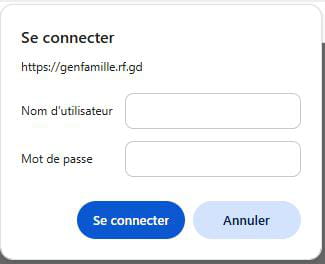
Regarding line 9, I have corrected and checked everywhere! It doesn't change. Still "Error 500".
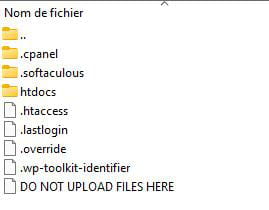
Here are the directories where my files are placed. The site is located in htdocs. Where is another directory for the login, and where is the file containing the scripts for the gestio !
-
You appear to have an .htaccess file in the htdocs/gestion folder to manage authentication; the problem may originate from this file.
Back up the .htaccess file in the htdocs/gestion folder, then try deleting or renaming it and reload the page to check if the 500 error comes from this file.
-
Indeed! I must have a problem with htaccess or the login password.
When I go to the files of my site, the main htaccess is located in htdocs/connexion, with the connexion.php file. I saw that in the folder htdocs/gestion I also have an htaccess file. And there is no txt file containing the password as in the folder htdocs/connexion. (I followed the same directory structure as on Free). If I delete the htacess file in infinityfree in the directory htdocs/gestion, I can directly access my management page. So, less protected.
I’m getting lost in all this ............... -
The error therefore seems to come from the file htdocs/gestion/.htaccess
In this file, the AuthUserFile line must point to the absolute path of the .htpasswd file that contains the password; this path is different on every server, so it must be corrected when changing hosting.
To find the absolute path, you can create a dir.php file in the htdocs/gestion folder (or in the folder where the .htpasswd file is located) with only this code: <?php echo __DIR_;
Then display it in the browser. You can then delete the dir.php file
The AuthUserFile line should then look like this (with the real path corresponding to your hosting):AuthUserFile "/home/vol1X_X/infinityfree.com/ifX_XXX/domain.com/htdocs/gestion/.htpasswd"
Alternatively, instead of authentication via .htaccess, your host recommends using the Protected Directories menu in the control panel of your hosting space. This solution will probably be easier to implement:
forum.infinityfree.com/t/acces-au-site-par-autentification/121049/8 -
Here we go!!!! I did it!!!!!!
Actually, you have to do everything through the InfinityFree interface. The .htaccess, as well as the .htpasswd
Thanks for your help!!!!