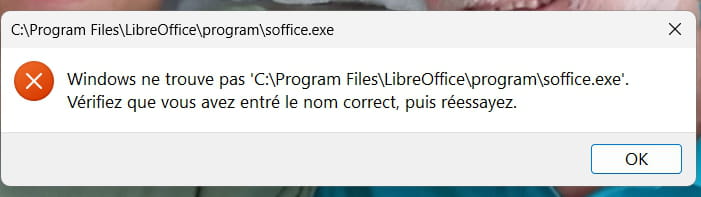
OpenOffice 26.8 release opening
Hello,
Yesterday I updated OpenOffice and now I am unable to open my files
here is the error page
Thank you for kindly helping me
Best regards
Joly
1 answer
-

Hello,
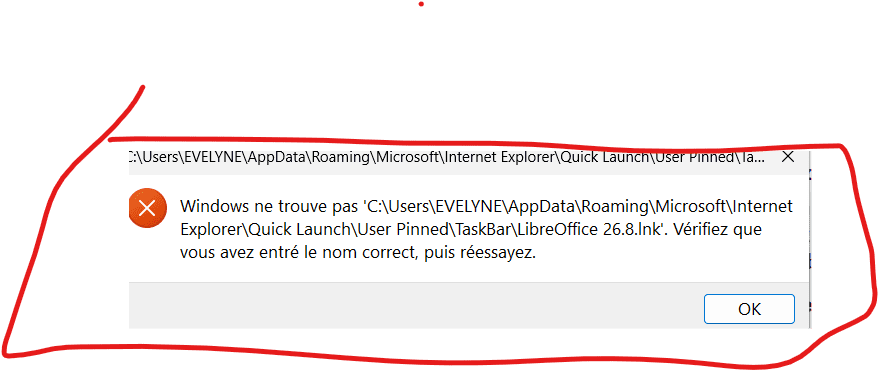
The error message in the screenshot concerns LibreOffice 26.8, not OpenOffice!
The message indicates that Windows can no longer find the shortcut to LibreOffice 26.8.
The path visible in your screenshot begins with
C:\Users\EVELYNE\AppData\Roaming\Microsoft\Internet Explorer\Quick Launch\User Pinned\...:This is not the LibreOffice program itself, but simply the old shortcut pinned to the taskbar.
The taskbar shortcut therefore points to a file that no longer exists at the indicated location.
To fix the problem, delete the old LibreOffice shortcut, right-click the LibreOffice icon on the taskbar.
Choose Unpin from taskbar…
Then, check that LibreOffice is still properly installed!
Next, press the Windows key and the S key at the same time.
(Windows + S).Next, type LibreOffice in the search box and if LibreOffice appears, launch it.
Once open, right-click its icon in the taskbar → Pin to taskbar.
Otherwise, if LibreOffice does not appear, it is likely that LibreOffice is uninstalled or that its installation is corrupted; in this case, you will need to reinstall LibreOffice, then recreate the shortcut.