First line on spreadsheet is missing
yclik Posted messages 3883 Registration date Status Member Last intervention -
Hello,
I’m starting on the second line in a LibreOffice spreadsheet file.
How can I display that first line, which had the column labels and was very useful for filtering and sorting?
Thank you.
2 answers
-
Good evening,
If I understood the request correctly, you want to have visibility on the header row of the columns even if you are at the bottom of your table.
Position yourself on the cell under the header to the left of the table (if the headers start at A2, position yourself at A3)
Go to View and click on Freeze Panes.
Otherwise, further explanations are welcome.
Best regards
-
Hello,
.
After re-reading the question, I have a doubt because the subject title says "Office" and the first line of explanations says "LibreOffice".
.
My first answer concerns the Calc spreadsheet.
.
For Excel, it is the same procedure (place the cursor on A3 for the first header on A2) then go to the View tab and you need to click on Freeze Panes
.
Best regards
-
-
Hello
as well understood :
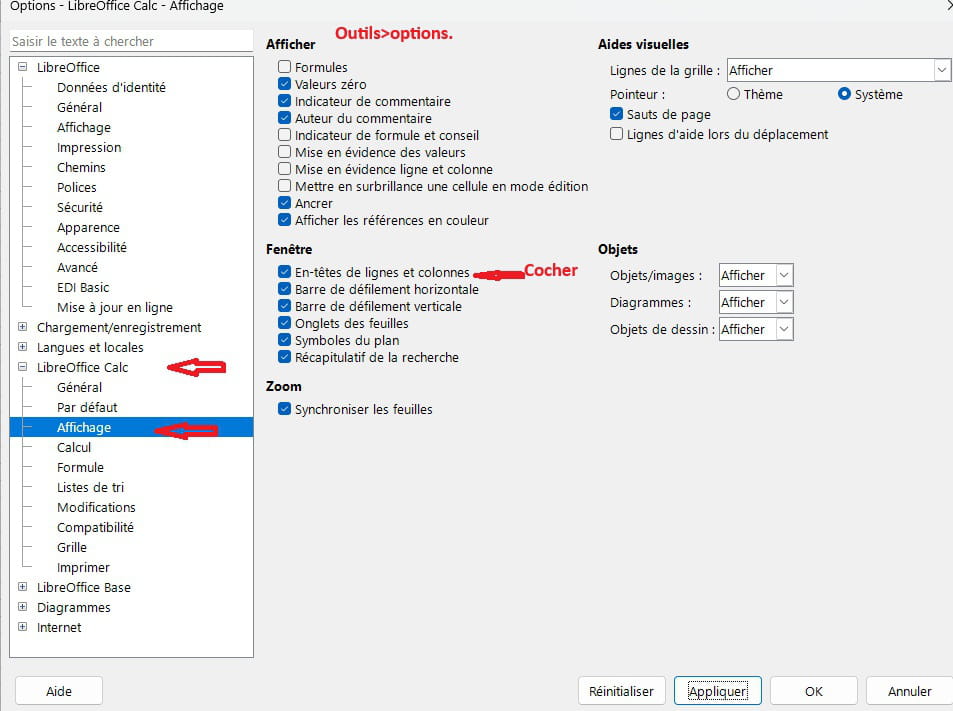
to have the letters of the columns and the row numbers
Tools>options...