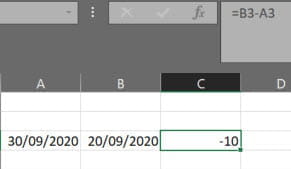
Calculation in days between 2 dates, even negative.
Hello,
I use the function =DATEDIF(Q2944,R2944,"D")
to calculate the number of overdue days between two dates (the payment date compared to the due date)
It works
but I also want to display negative results and I get an error ... error: #NUM!
for example, a client should pay on September 30, and he pays on September 20, basically I want to see -10
Thank you for your help!
Related links:
- IF function between 2 dates
- calculation of working days between two dates
- Calculation of the number of months (even incomplete) between two dates
- Distance (Km) Calculation and Travel Time between 2 Cities
- calculate a positive or negative difference between two values
- MFC date of the day between two dates in the table
1 answer
-
Hello,
in that case, there's no need to use DATEDIF
You can just do =Q2944-R2944
it will give you a result in number of days, which you can change if you want a result in weeks for example.-
-
-
@NDOWe sometimes love to make things more complicated for ourselves ^^
Remember to mark the topic as [Solved] ;)
Have a nice day.
-