
CPU Guardian PC Monitor Protection de la vie privée
Solved
Donherve
-
Malekal_morte- Posted messages 178136 Registration date Status Modérateur, Contributeur sécurité Last intervention -
Malekal_morte- Posted messages 178136 Registration date Status Modérateur, Contributeur sécurité Last intervention -
Hello,
Configuration: Windows / Firefox 61.0
Hello,
Configuration: Windows / Firefox 61.0
I believe this is the first time I'm leaving a message on a forum to ask for help, I hope I'm doing it right.
My partner seems to have clearly been scammed. Her computer froze. According to her, she couldn't turn it off and a message told her that her computer had a serious problem and that she needed to call the number that appeared on her screen. And she did. A phone operator took control of her new PC, worrying her about the lack of protection it had and told her to contact an IT engineer whose number she provided. This company is called Micro Computer and claims to be well-known worldwide. She didn't go as far as buying anything, but it worried me. She changed all her passwords from another computer and turned off her laptop. She didn't touch it until I got back. When I returned, upon turning on the PC, the PC configuration was set up (do I accept the geolocation of the PC, data sharing with Microsoft, Cortana, and everything else). I made my choices, and once on the computer's desktop, I went into the control panel to find the programs. Windows had been reinstalled on the day of the scam, with a bonus: CPU Guardian, Privacy Protect, and PC Monitor. I managed to uninstall the last two programs from the control panel, but not CPU Guardian. A window appears telling me that I do not have the necessary permissions... I installed Malwarebytes, and it quarantined Rogue.TechSupportScam. CPU Guardian remains active. What should I do? The PC has barely been used. But my bank details were on it and this intrusion doesn't leave me in peace.
Thank you for your response.
Configuration: Windows / Firefox 61.0
Hello,
Configuration: Windows / Firefox 61.0
I believe this is the first time I'm leaving a message on a forum to ask for help, I hope I'm doing it right.
My partner seems to have clearly been scammed. Her computer froze. According to her, she couldn't turn it off and a message told her that her computer had a serious problem and that she needed to call the number that appeared on her screen. And she did. A phone operator took control of her new PC, worrying her about the lack of protection it had and told her to contact an IT engineer whose number she provided. This company is called Micro Computer and claims to be well-known worldwide. She didn't go as far as buying anything, but it worried me. She changed all her passwords from another computer and turned off her laptop. She didn't touch it until I got back. When I returned, upon turning on the PC, the PC configuration was set up (do I accept the geolocation of the PC, data sharing with Microsoft, Cortana, and everything else). I made my choices, and once on the computer's desktop, I went into the control panel to find the programs. Windows had been reinstalled on the day of the scam, with a bonus: CPU Guardian, Privacy Protect, and PC Monitor. I managed to uninstall the last two programs from the control panel, but not CPU Guardian. A window appears telling me that I do not have the necessary permissions... I installed Malwarebytes, and it quarantined Rogue.TechSupportScam. CPU Guardian remains active. What should I do? The PC has barely been used. But my bank details were on it and this intrusion doesn't leave me in peace.
Thank you for your response.
5 réponses

Hello,
This is a telephone support scam intended to make you believe that your PC is infected so that you call a support center...
The purpose of this support is to reinforce the idea that your computer is infected, ultimately making you purchase expensive software or subscribe to remote support services, all at prices above 150 euros.
These fake virus messages seek to block the web browser and claim that the PC is infected; they originate from:
- advertisements on illegal streaming/torrent sites
- advertisements on Facebook also spread them.
In the past, phone campaigns where you received a call from a technician pretending to be from Microsoft were also used.
Your computer is not infected.
These false virus alerts are common and not just in this context; for example, these false alerts can also be used to push unreliable cleaning software (Reimage, PCKepeer, MacKeeper, etc). Read these files to understand better and get examples.
- telephone support scams
- Scam: false virus alerts.
The first page contains explanations on how to unblock the internet browser.
Why are these scams?

If you have been in contact with a technician and have paid:
The following message provides a lot of indications on the remedies you can follow: https://forums.commentcamarche.net/forum/affich-33912189-quoi-penser-de-gigasoftpc-fr#22
1/ Report it: If you have information about the company name, etc., I encourage you to report these practices; provide the company name as well as the contact phone number displayed on the fake virus message:

2/ Call them back and threaten to file a complaint, and don't hesitate to use the information in the gray box given above. Request a refund
3/ Cleaning or remote access software may have been installed with the intention of selling them to you.
You need to do some cleaning.
Go to the Control Panel
then Programs and Features.
Sort the list by date by clicking on the column.
Uninstall all software that was installed on the day of the takeover.
Optionally, for security reasons, change your passwords; the goal is not to infect the computer or recover data but to make you purchase cleaning software, antivirus, or subscribe to their support.
~~
If you want to be reassured and check your computer:
Follow the FRST tutorial. ( take the time to read carefully - everything is well explained ).
Download and run the FRST scan,
Wait for the end of the scan; a message indicates that the analysis is complete.
Three FRST reports will be generated:
Send these 3 reports to the site https://pjjoint.malekal.com/ to share them.
In return, provide the 3 pjjoint links that lead to the reports here in a new response so that we can review them.
--
Please press a key to continue the disinfection...
This is a telephone support scam intended to make you believe that your PC is infected so that you call a support center...
The purpose of this support is to reinforce the idea that your computer is infected, ultimately making you purchase expensive software or subscribe to remote support services, all at prices above 150 euros.
These fake virus messages seek to block the web browser and claim that the PC is infected; they originate from:
- advertisements on illegal streaming/torrent sites
- advertisements on Facebook also spread them.
In the past, phone campaigns where you received a call from a technician pretending to be from Microsoft were also used.
Your computer is not infected.
These false virus alerts are common and not just in this context; for example, these false alerts can also be used to push unreliable cleaning software (Reimage, PCKepeer, MacKeeper, etc). Read these files to understand better and get examples.
- telephone support scams
- Scam: false virus alerts.
The first page contains explanations on how to unblock the internet browser.
Why are these scams?
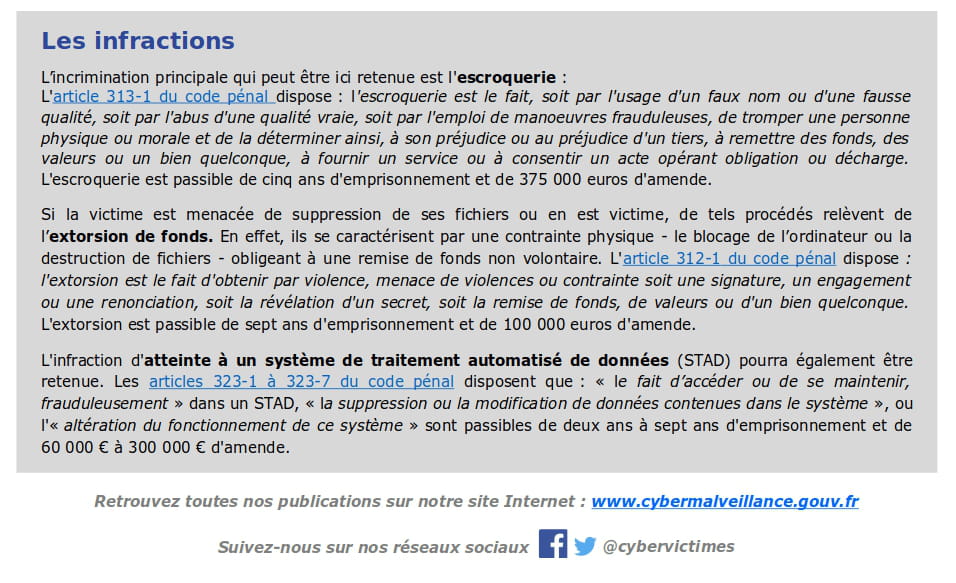
If you have been in contact with a technician and have paid:
The following message provides a lot of indications on the remedies you can follow: https://forums.commentcamarche.net/forum/affich-33912189-quoi-penser-de-gigasoftpc-fr#22
1/ Report it: If you have information about the company name, etc., I encourage you to report these practices; provide the company name as well as the contact phone number displayed on the fake virus message:
2/ Call them back and threaten to file a complaint, and don't hesitate to use the information in the gray box given above. Request a refund
3/ Cleaning or remote access software may have been installed with the intention of selling them to you.
You need to do some cleaning.
Go to the Control Panel
then Programs and Features.
Sort the list by date by clicking on the column.
Uninstall all software that was installed on the day of the takeover.
Optionally, for security reasons, change your passwords; the goal is not to infect the computer or recover data but to make you purchase cleaning software, antivirus, or subscribe to their support.
~~
If you want to be reassured and check your computer:
Follow the FRST tutorial. ( take the time to read carefully - everything is well explained ).
Download and run the FRST scan,
Wait for the end of the scan; a message indicates that the analysis is complete.
Three FRST reports will be generated:
- FRST.txt
- Shortcut.txt
- Additionnal.txt
Send these 3 reports to the site https://pjjoint.malekal.com/ to share them.
In return, provide the 3 pjjoint links that lead to the reports here in a new response so that we can review them.
--
Please press a key to continue the disinfection...
Hello,
Go to the Control Panel
then Programs and Features.
Uninstall:
CPU Guardian
Lenovo App Explorer
Here is the correction to be made with FRST. You can refer to this explanatory note with screenshots.
Restart FRST then press CTRL + Y on your keyboard.
The Notepad will open, copy/paste this.
Save the content from the file menu then save.
Close Notepad, return to FRST and click the "Fix" button
A restart may be required and automatic.
A text file will appear, copy/paste the content here in a new message.
Restart the computer.
Go to the Control Panel
then Programs and Features.
Uninstall:
CPU Guardian
Lenovo App Explorer
Here is the correction to be made with FRST. You can refer to this explanatory note with screenshots.
Restart FRST then press CTRL + Y on your keyboard.
The Notepad will open, copy/paste this.
CreateRestorePoint:
CloseProcesses:
 2018-09-04 21:24 - 2018-09-12 23:05 - 000002584 _____ C:\WINDOWS\System32\Tasks\CPUGuardian_Popup
Task: {F7EAE93B-251C-46D1-874F-B25CD0A47A22} - System32\Tasks\App Explorer => C:\Users\Rebecca Goldblat\AppData\Local\Host App Service\Engine\HostAppServiceUpdater.exe [2018-05-29] (SweetLabs, Inc) <==== WARNING
2018-09-04 11:24 - 2018-09-12 11:39 - 000000000 ____D C:\Program Files (x86)\CPU Guardian
2018-09-04 11:24 - 2018-09-04 21:16 - 000000000 ____D C:\Users\Rebecca Goldblat\AppData\Roaming\Microsoft\Windows\Start Menu\Programs\CPU Guardian
2018-09-04 11:24 - 2018-09-04 11:25 - 000000000 ____D C:\Users\Rebecca Goldblat\Documents\CPUGuardian
2018-09-04 11:24 - 2018-09-04 11:24 - 000000000 ____D C:\Users\Rebecca Goldblat\AppData\Local\CPU_Guardian
2018-09-04 11:24 - 2018-09-04 11:24 - 000000000 ____D C:\ProgramData\CPU Guardian
2018-09-04 11:09 - 2018-09-04 12:25 - 000000054 _____ C:\END
2018-09-04 11:09 - 2018-09-04 11:09 - 000000000 ____D C:\Users\Rebecca Goldblat\AppData\Roaming\supportdotcom
2018-09-04 11:09 - 2018-09-04 11:09 - 000000000 ____D C:\Users\Rebecca Goldblat\AppData\Local\SPRT
2018-09-04 11:09 - 2018-09-04 11:09 - 000000000 ____D C:\Program Files (x86)\supportdotcom
Task: {5D5430ED-9972-4933-B76C-09C6A000CCDE} - System32\Tasks\CPUGuardian_Popup => C:\Program Files (x86)\CPU Guardian\Splash.exe [2017-01-26] ()
 Hosts:
EmptyTemp:
RemoveProxy:
Reboot:
Save the content from the file menu then save.
Close Notepad, return to FRST and click the "Fix" button
A restart may be required and automatic.
A text file will appear, copy/paste the content here in a new message.
Restart the computer.
Results of the Farbar Recovery Scan Tool (x64) Version: 09.09.2018
Executed by Rebecca Goldblat (13-09-2018 22:54:41) Run:1
Executed from C:\Users\Rebecca Goldblat\Desktop
Loaded Profiles: Rebecca Goldblat (Available Profiles: Rebecca Goldblat)
Boot Mode: Normal
==============================================
fixlist content:
CreateRestorePoint:
CloseProcesses:
2018-09-04 21:24 - 2018-09-12 23:05 - 000002584 _____ C:\WINDOWS\System32\Tasks\CPUGuardian_Popup
Task: {F7EAE93B-251C-46D1-874F-B25CD0A47A22} - System32\Tasks\App Explorer => C:\Users\Rebecca Goldblat\AppData\Local\Host App Service\Engine\HostAppServiceUpdater.exe [2018-05-29] (SweetLabs, Inc) <==== WARNING
2018-09-04 11:24 - 2018-09-12 11:39 - 000000000 ____D C:\Program Files (x86)\CPU Guardian
2018-09-04 11:24 - 2018-09-04 21:16 - 000000000 ____D C:\Users\Rebecca Goldblat\AppData\Roaming\Microsoft\Windows\Start Menu\Programs\CPU Guardian
2018-09-04 11:24 - 2018-09-04 11:25 - 000000000 ____D C:\Users\Rebecca Goldblat\Documents\CPUGuardian
2018-09-04 11:24 - 2018-09-04 11:24 - 000000000 ____D C:\Users\Rebecca Goldblat\AppData\Local\CPU_Guardian
2018-09-04 11:24 - 2018-09-04 11:24 - 000000000 ____D C:\ProgramData\CPU Guardian
2018-09-04 11:09 - 2018-09-04 12:25 - 000000054 _____ C:\END
2018-09-04 11:09 - 2018-09-04 11:09 - 000000000 ____D C:\Users\Rebecca Goldblat\AppData\Roaming\supportdotcom
2018-09-04 11:09 - 2018-09-04 11:09 - 000000000 ____D C:\Users\Rebecca Goldblat\AppData\Local\SPRT
2018-09-04 11:09 - 2018-09-04 11:09 - 000000000 ____D C:\Program Files (x86)\supportdotcom
Task: {5D5430ED-9972-4933-B76C-09C6A000CCDE} - System32\Tasks\CPUGuardian_Popup => C:\Program Files (x86)\CPU Guardian\Splash.exe [2017-01-26] ()
Hosts:
EmptyTemp:
RemoveProxy:
Reboot:
Error: (0) Unable to create restore point.
Processes closed successfully.
C:\WINDOWS\System32\Tasks\CPUGuardian_Popup => moved successfully
HKLM\SOFTWARE\Microsoft\Windows NT\CurrentVersion\Schedule\TaskCache\Tasks\{F7EAE93B-251C-46D1-874F-B25CD0A47A22} => not found
"C:\WINDOWS\System32\Tasks\App Explorer" => not found
HKLM\SOFTWARE\Microsoft\Windows NT\CurrentVersion\Schedule\TaskCache\Tree\App Explorer => not found
C:\Program Files (x86)\CPU Guardian => moved successfully
C:\Users\Rebecca Goldblat\AppData\Roaming\Microsoft\Windows\Start Menu\Programs\CPU Guardian => moved successfully
C:\Users\Rebecca Goldblat\Documents\CPUGuardian => moved successfully
C:\Users\Rebecca Goldblat\AppData\Local\CPU_Guardian => moved successfully
C:\ProgramData\CPU Guardian => moved successfully
C:\END => moved successfully
C:\Users\Rebecca Goldblat\AppData\Roaming\supportdotcom => moved successfully
C:\Users\Rebecca Goldblat\AppData\Local\SPRT => moved successfully
C:\Program Files (x86)\supportdotcom => moved successfully
"HKLM\SOFTWARE\Microsoft\Windows NT\CurrentVersion\Schedule\TaskCache\Plain\{5D5430ED-9972-4933-B76C-09C6A000CCDE}" => deleted successfully
"HKLM\SOFTWARE\Microsoft\Windows NT\CurrentVersion\Schedule\TaskCache\Tasks\{5D5430ED-9972-4933-B76C-09C6A000CCDE}" => deleted successfully
"C:\WINDOWS\System32\Tasks\CPUGuardian_Popup" => not found
"HKLM\SOFTWARE\Microsoft\Windows NT\CurrentVersion\Schedule\TaskCache\Tree\CPUGuardian_Popup" => deleted successfully
C:\Windows\System32\Drivers\etc\hosts => moved successfully
Hosts restored successfully.
========= RemoveProxy: =========
"HKU\.DEFAULT\SOFTWARE\Microsoft\Windows\CurrentVersion\Internet Settings\Connections\\DefaultConnectionSettings" => deleted successfully
"HKU\.DEFAULT\SOFTWARE\Microsoft\Windows\CurrentVersion\Internet Settings\Connections\\SavedLegacySettings" => deleted successfully
"HKU\S-1-5-21-2279203887-4183090003-4129190423-1001\SOFTWARE\Microsoft\Windows\CurrentVersion\Internet Settings\Connections\\DefaultConnectionSettings" => deleted successfully
"HKU\S-1-5-21-2279203887-4183090003-4129190423-1001\SOFTWARE\Microsoft\Windows\CurrentVersion\Internet Settings\Connections\\SavedLegacySettings" => deleted successfully
========= End of RemoveProxy: =========
=========== EmptyTemp: ==========
BITS transfer queue => 6053888 B
DOMStore, IE Recovery, AppCache, Feeds Cache, Thumbcache, IconCache => 13753742 B
Java, Flash, Steam htmlcache => 524 B
Windows/system/drivers => 1870237 B
Edge => 24587275 B
Chrome => 0 B
Firefox => 416038820 B
Opera => 0 B
Temp, IE cache, history, cookies, recent:
Default => 0 B
Users => 0 B
ProgramData => 0 B
Public => 0 B
systemprofile => 0 B
systemprofile32 => 0 B
LocalService => 1838 B
LocalService => 0 B
NetworkService => 0 B
NetworkService => 0 B
Rebecca Goldblat => 61155312 B
RecycleBin => 4516106 B
EmptyTemp: => 503.5 MB of temporary data deleted.
================================
The system had to restart.
Executed by Rebecca Goldblat (13-09-2018 22:54:41) Run:1
Executed from C:\Users\Rebecca Goldblat\Desktop
Loaded Profiles: Rebecca Goldblat (Available Profiles: Rebecca Goldblat)
Boot Mode: Normal
==============================================
fixlist content:
CreateRestorePoint:
CloseProcesses:
2018-09-04 21:24 - 2018-09-12 23:05 - 000002584 _____ C:\WINDOWS\System32\Tasks\CPUGuardian_Popup
Task: {F7EAE93B-251C-46D1-874F-B25CD0A47A22} - System32\Tasks\App Explorer => C:\Users\Rebecca Goldblat\AppData\Local\Host App Service\Engine\HostAppServiceUpdater.exe [2018-05-29] (SweetLabs, Inc) <==== WARNING
2018-09-04 11:24 - 2018-09-12 11:39 - 000000000 ____D C:\Program Files (x86)\CPU Guardian
2018-09-04 11:24 - 2018-09-04 21:16 - 000000000 ____D C:\Users\Rebecca Goldblat\AppData\Roaming\Microsoft\Windows\Start Menu\Programs\CPU Guardian
2018-09-04 11:24 - 2018-09-04 11:25 - 000000000 ____D C:\Users\Rebecca Goldblat\Documents\CPUGuardian
2018-09-04 11:24 - 2018-09-04 11:24 - 000000000 ____D C:\Users\Rebecca Goldblat\AppData\Local\CPU_Guardian
2018-09-04 11:24 - 2018-09-04 11:24 - 000000000 ____D C:\ProgramData\CPU Guardian
2018-09-04 11:09 - 2018-09-04 12:25 - 000000054 _____ C:\END
2018-09-04 11:09 - 2018-09-04 11:09 - 000000000 ____D C:\Users\Rebecca Goldblat\AppData\Roaming\supportdotcom
2018-09-04 11:09 - 2018-09-04 11:09 - 000000000 ____D C:\Users\Rebecca Goldblat\AppData\Local\SPRT
2018-09-04 11:09 - 2018-09-04 11:09 - 000000000 ____D C:\Program Files (x86)\supportdotcom
Task: {5D5430ED-9972-4933-B76C-09C6A000CCDE} - System32\Tasks\CPUGuardian_Popup => C:\Program Files (x86)\CPU Guardian\Splash.exe [2017-01-26] ()
Hosts:
EmptyTemp:
RemoveProxy:
Reboot:
Error: (0) Unable to create restore point.
Processes closed successfully.
C:\WINDOWS\System32\Tasks\CPUGuardian_Popup => moved successfully
HKLM\SOFTWARE\Microsoft\Windows NT\CurrentVersion\Schedule\TaskCache\Tasks\{F7EAE93B-251C-46D1-874F-B25CD0A47A22} => not found
"C:\WINDOWS\System32\Tasks\App Explorer" => not found
HKLM\SOFTWARE\Microsoft\Windows NT\CurrentVersion\Schedule\TaskCache\Tree\App Explorer => not found
C:\Program Files (x86)\CPU Guardian => moved successfully
C:\Users\Rebecca Goldblat\AppData\Roaming\Microsoft\Windows\Start Menu\Programs\CPU Guardian => moved successfully
C:\Users\Rebecca Goldblat\Documents\CPUGuardian => moved successfully
C:\Users\Rebecca Goldblat\AppData\Local\CPU_Guardian => moved successfully
C:\ProgramData\CPU Guardian => moved successfully
C:\END => moved successfully
C:\Users\Rebecca Goldblat\AppData\Roaming\supportdotcom => moved successfully
C:\Users\Rebecca Goldblat\AppData\Local\SPRT => moved successfully
C:\Program Files (x86)\supportdotcom => moved successfully
"HKLM\SOFTWARE\Microsoft\Windows NT\CurrentVersion\Schedule\TaskCache\Plain\{5D5430ED-9972-4933-B76C-09C6A000CCDE}" => deleted successfully
"HKLM\SOFTWARE\Microsoft\Windows NT\CurrentVersion\Schedule\TaskCache\Tasks\{5D5430ED-9972-4933-B76C-09C6A000CCDE}" => deleted successfully
"C:\WINDOWS\System32\Tasks\CPUGuardian_Popup" => not found
"HKLM\SOFTWARE\Microsoft\Windows NT\CurrentVersion\Schedule\TaskCache\Tree\CPUGuardian_Popup" => deleted successfully
C:\Windows\System32\Drivers\etc\hosts => moved successfully
Hosts restored successfully.
========= RemoveProxy: =========
"HKU\.DEFAULT\SOFTWARE\Microsoft\Windows\CurrentVersion\Internet Settings\Connections\\DefaultConnectionSettings" => deleted successfully
"HKU\.DEFAULT\SOFTWARE\Microsoft\Windows\CurrentVersion\Internet Settings\Connections\\SavedLegacySettings" => deleted successfully
"HKU\S-1-5-21-2279203887-4183090003-4129190423-1001\SOFTWARE\Microsoft\Windows\CurrentVersion\Internet Settings\Connections\\DefaultConnectionSettings" => deleted successfully
"HKU\S-1-5-21-2279203887-4183090003-4129190423-1001\SOFTWARE\Microsoft\Windows\CurrentVersion\Internet Settings\Connections\\SavedLegacySettings" => deleted successfully
========= End of RemoveProxy: =========
=========== EmptyTemp: ==========
BITS transfer queue => 6053888 B
DOMStore, IE Recovery, AppCache, Feeds Cache, Thumbcache, IconCache => 13753742 B
Java, Flash, Steam htmlcache => 524 B
Windows/system/drivers => 1870237 B
Edge => 24587275 B
Chrome => 0 B
Firefox => 416038820 B
Opera => 0 B
Temp, IE cache, history, cookies, recent:
Default => 0 B
Users => 0 B
ProgramData => 0 B
Public => 0 B
systemprofile => 0 B
systemprofile32 => 0 B
LocalService => 1838 B
LocalService => 0 B
NetworkService => 0 B
NetworkService => 0 B
Rebecca Goldblat => 61155312 B
RecycleBin => 4516106 B
EmptyTemp: => 503.5 MB of temporary data deleted.
================================
The system had to restart.
End of Fixlog 22:56:19
I think everything is fine on the computer side.
Delete the folder C:\FRST
Finish with a cleanup using Malwarebytes - Malwarebytes Anti-Malware Free Version Tutorial
Avoid regular scans and cleanups with ZHPCleaner, AdwCleaner, not useful.
--
Please press any key to continue the disinfection...
Delete the folder C:\FRST
Finish with a cleanup using Malwarebytes - Malwarebytes Anti-Malware Free Version Tutorial
Avoid regular scans and cleanups with ZHPCleaner, AdwCleaner, not useful.
--
Please press any key to continue the disinfection...
Thank you very much for your response,
here are the requested links:
https://pjjoint.malekal.com/files.php?id=FRST_20180913_w9l12t11u9h11
https://pjjoint.malekal.com/files.php?id=20180913_k57i11t9g10
https://pjjoint.malekal.com/files.php?id=20180913_g6r7s8b6z6
here are the requested links:
https://pjjoint.malekal.com/files.php?id=FRST_20180913_w9l12t11u9h11
https://pjjoint.malekal.com/files.php?id=20180913_k57i11t9g10
https://pjjoint.malekal.com/files.php?id=20180913_g6r7s8b6z6
You did well =)